Add a Node to Oracle 19c RAC Using addnode.sh — Step-by-Step Lab in 30 Minutes (2026)
By DBNexus Editorial Team · Oracle DBA
Published June 3, 2026 · 8 min read
Your client just bought another server. Sales doubled overnight, the existing two-node 19c RAC is sweating at 80% CPU, and the CTO wants a third node online before next quarter starts. The good news: adding a node to Oracle 19c RAC is one of the cleanest operations Clusterware exposes — addnode.sh does most of the work, the existing instances never bounce, and on a clean preflight you can have a third instance opening the database in well under 30 minutes. The bad news: if you skip cluvfy or get /etc/hosts wrong, you can fail the root.sh and leave OCR in an awkward half-joined state. This post walks the exact command sequence — preflight, cluvfy, GI extend, root.sh, RDBMS extend, dbca instance add, and the three post-checks that prove the node is really in. Same muscle memory carries forward to 23ai and 26ai.
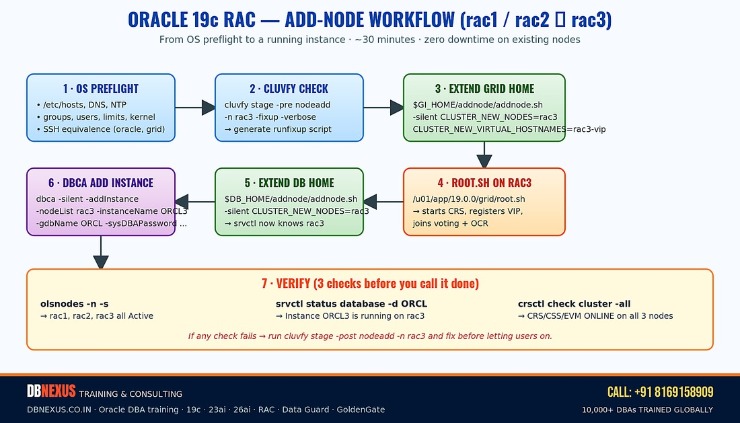 The seven steps from OS preflight to a verified third instance.
Before You Touch addnode.sh: The Preflight That Saves You
Half of all node-add failures happen before you run a single Oracle command. The new node has to look identical to the existing nodes from the cluster's point of view — same OS release, same kernel parameters, same shell limits, same groups and UIDs/GIDs for the grid and oracle owners, same packages, same time source, and the same view of every interconnect and public network. If any of that drifts, root.sh on rac3 will fail at the CSS-join step and you'll spend two hours unwinding partial OCR registration.
On rac3, get the basics right first:
# On rac3 — match rac1/rac2 exactly
cat /etc/oracle-release       # must match existing nodes
uname -r                      # kernel must match
getent passwd grid oracle     # same UIDs as rac1/rac2
getent group oinstall dba asmadmin asmdba asmoper
ulimit -a                     # nofile, nproc, stack, memlock per Oracle MOS
# Time source — chronyd or ctssd, do NOT mix
systemctl status chronyd
# Disable Transparent HugePages, set vm.nr_hugepages per SGA
Then make rac3 visible to rac1 and rac2 (and vice-versa) on three networks: public hostname, VIP, and the private interconnect. The /etc/hosts on every node must be identical. SSH user equivalence is required for both grid and oracle — between rac1↔rac3 and rac2↔rac3, in both directions, including the node-to-itself loop.
Step 1–2: Hostname, /etc/hosts, and cluvfy Pre-Checks
The reference /etc/hosts entries for a 3-node lab look like this — public, VIP, and private on three separate subnets:
# /etc/hosts on rac1, rac2, rac3 — all identical
192.168.56.101   rac1.dbnexus.lab   rac1
192.168.56.102   rac2.dbnexus.lab   rac2
192.168.56.103   rac3.dbnexus.lab   rac3
192.168.56.111   rac1-vip.dbnexus.lab   rac1-vip
192.168.56.112   rac2-vip.dbnexus.lab   rac2-vip
192.168.56.113   rac3-vip.dbnexus.lab   rac3-vip
10.10.10.101     rac1-priv
10.10.10.102     rac2-priv
10.10.10.103     rac3-priv
# SCAN goes to DNS, not /etc/hosts
Then run cluvfy as the grid user from rac1. The -fixup flag generates a runfixup script that patches the kernel/limits gaps cluvfy finds; the -method root option lets cluvfy use sudo to execute the fixup on rac3:
# From an existing node, as grid
cluvfy stage -pre nodeadd -n rac3 -fixup -verbose 2>&1 | tee /tmp/cluvfy_pre_rac3.log

# Common findings cluvfy flags and how to fix on rac3
echo "vm.swappiness = 1"        >> /etc/sysctl.d/99-oracle.conf
echo "oracle hard memlock 134217728" >> /etc/security/limits.d/99-oracle.conf
sysctl -p /etc/sysctl.d/99-oracle.conf
Do not skip a single FAILED line. The classic trap is a warning about the swap size that everyone ignores — and then root.sh fails because Clusterware can't pin the CSS daemon's working set. Re-run cluvfy until the output ends with Verification of node add was successful. Then re-run (briefly: at DBNexus, this is the exact checklist our Oracle DBA training students drill in the lab before they're allowed near a production add-node).
Step 3–4: Extend the Grid Home with addnode.sh
Once cluvfy is clean, the Grid Infrastructure extend itself is a single silent command. Run it as the grid user from an existing node (rac1), pointing at the GI home that's already installed:
# As grid on rac1
cd $ORACLE_HOME/addnode
./addnode.sh -silent \
  "CLUSTER_NEW_NODES={rac3}" \
  "CLUSTER_NEW_VIRTUAL_HOSTNAMES={rac3-vip}" \
  "CLUSTER_NEW_NODE_ROLES={HUB}"

# If cluvfy flagged non-blocking warnings you've already triaged:
./addnode.sh -silent -ignorePrereqFailure \
  "CLUSTER_NEW_NODES={rac3}" \
  "CLUSTER_NEW_VIRTUAL_HOSTNAMES={rac3-vip}" \
  "CLUSTER_NEW_NODE_ROLES={HUB}"
The script copies the GI home from rac1 to rac3 over SSH (so user equivalence had better be working), relinks the binaries on rac3, and then prints the two scripts you must execute on rac3 as root:
# On rac3 as root — order matters
/u01/app/oraInventory/orainstRoot.sh
/u01/app/19.0.0/grid/root.sh
root.sh on rac3 is the moment the new node actually joins the cluster: it configures OLR, joins the CSS group, registers the VIP, brings up CRS/EVM, and mounts the ASM disk groups. Watch /u01/app/19.0.0/grid/install/root_rac3*.log live — if it hangs more than five minutes past 'Adding daemon to inittab' you almost certainly have a private interconnect or shared-storage visibility problem. The fix is on the OS, not in Clusterware.
Walkthrough video — Oracle 19c RAC Step By Step 04: Add Node to cluster from the DBNexus YouTube channel (200+ Oracle DBA tutorials). Subscribe if you want the full RAC build series.
Step 5: Extend the RDBMS Home So srvctl Knows About rac3
With Grid extended, repeat the addnode.sh dance for the RDBMS home — this time as the oracle user. This is the step new RAC DBAs forget; without it, srvctl has no idea the database binaries exist on rac3 and dbca will refuse to add an instance there:
# As oracle on rac1
cd $ORACLE_HOME/addnode
./addnode.sh -silent "CLUSTER_NEW_NODES={rac3}"

# Then on rac3 as root
/u01/app/oracle/product/19.0.0/dbhome_1/root.sh
Verify both homes are registered on rac3 before you touch dbca:
# On rac1 as grid
olsnodes -n -s -t
# rac1     1   Active  Unpinned
# rac2     2   Active  Unpinned
# rac3     3   Active  Unpinned

crsctl check cluster -all
srvctl status nodeapps -n rac3
srvctl config database -d ORCL | grep -i 'instance\|node'
Step 6: Add the Database Instance Without Bouncing Anything
The instance add is the safest step in the whole flow — it's an online operation that does not require a single bounce on rac1 or rac2. As oracle on rac1:
# As oracle on rac1
dbca -silent -addInstance \
  -nodeList rac3 \
  -gdbName ORCL \
  -instanceName ORCL3 \
  -sysDBAUserName sys \
  -sysDBAPassword 'Your_SYS_password'

# Optional: if undo and redo threads were not pre-allocated,
# dbca creates UNDOTBS3 and redo thread 3 automatically.
Behind the scenes, dbca creates the spfile entries for ORCL3.instance_number=3, ORCL3.thread=3, ORCL3.undo_tablespace=UNDOTBS3, adds redo log thread 3, registers the new instance with srvctl, and starts it. If the database was already RAC One Node or had a dedicated SCAN listener, dbca handles the listener registration too.
If anything feels off after the instance starts — odd wait events, sudden GC traffic spikes, or session pile-ups while services rebalance — kill the noisy sessions before the symptom propagates. The 60-second blocking-session playbook is exactly the muscle memory you want here. And if rac3 evicts itself within the first hour, it's almost always a private interconnect MTU or jumbo-frames mismatch — see the deep dive on RAC node eviction.
What to Do When It Doesn't Work
Three failures account for ~80% of broken add-nodes. Memorize the symptom and the fix:
root.sh on rac3 hangs at 'Adding daemon to inittab' — private interconnect can't see the existing nodes' clusterware mcast/ucast. Check that oifcfg getif matches on all three nodes, MTU is identical (1500 vs 9000 jumbo), and the switch isn't filtering UDP 42424. Roll back with $GI_HOME/crs/install/rootcrs.sh -deconfig -force on rac3, fix the network, retry.
addnode.sh silently refuses to ship files — SSH user equivalence is half-broken. Re-run sshUserSetup.sh -user grid -hosts "rac1 rac2 rac3" -advanced -noPromptPassphrase and prove with ssh rac3 date as grid from rac1 without a password prompt.
dbca says 'Instance ORCL3 already exists' — a previous failed add left srvctl entries behind. Clean with srvctl remove instance -d ORCL -i ORCL3 -force, drop UNDOTBS3 and redo thread 3 in SQL*Plus, then retry.
After a clean run, patch parity matters more than people realize. The RU level on rac3 must match rac1/rac2 exactly — if the cluster is sitting at 19.23 and you installed 19.24 on rac3, you'll see ORA-00600s at the first interconnect handshake. Confirm with opatch lspatches on every node and patch rac3 down to parity before opening the database to users. The current Oracle RU baselines are tracked in our April 2026 RU patch numbers post.
FAQ — Adding a Node to Oracle 19c RAC
Does the database have to be down to add a node?
No. Every step in this flow is online from the existing instances' perspective. ASM rebalances, services migrate, and SCAN listeners reconfigure without a bounce. The only outage is on rac3 itself — and rac3 has no users yet.
Can I use the same procedure to add a node to a 23ai or 26ai RAC?
Yes — the high-level flow is identical (preflight → cluvfy → GI addnode.sh → root.sh → RDBMS addnode.sh → dbca add instance). On 23ai/26ai, expect a few new cluvfy checks for SQL Firewall and AI Vector Search prerequisites, and the spfile defaults shift a little. The muscle memory carries over cleanly. Same is true for the Data Guard switchover flow you may want to plan after the new node is in.
Do I need to extend Data Guard standbys as well?
Yes — if the primary becomes 3-node, the standby almost always wants matching capacity for failover. Add a third node to the standby cluster the same way, then add the standby instance, register a new redo thread for it on the primary, and let MRP catch up.
How long does the whole add-node take in practice?
On a clean preflight, ~25–35 minutes wall-clock: 5 minutes cluvfy + GI silent install (5–10 min) + root.sh (5–8 min) + RDBMS extend (3–5 min) + dbca add instance (3–7 min). The variance is almost entirely root.sh — if your interconnect and storage are perfect it's fast.
Should I use the GUI installer or the silent addnode.sh?
Silent. Always silent in production. The GUI exists for learning; the silent command is reproducible, scriptable, audit-friendly, and works over SSH from a jump host with no X11 forwarding.
What to Do This Week
Stand up a 2-node 19c RAC in VirtualBox/KVM and add rac3 end-to-end. Time yourself — aim for sub-30 minutes on the second attempt.
Capture cluvfy output before and after on a known-good cluster — keep it as a reference for the next add-node.
Document your /etc/hosts, oifcfg, and ulimits in a one-page runbook so the next add-node is copy-paste.
Re-read the Adding and Deleting Cluster Nodes chapter of the 19c Clusterware Administration guide — the appendix has the exact response-file template for fully unattended adds.
Ready to ship a 3-node RAC in production? Train with DBNexus.
DBNexus Training & Consulting (formerly Oracle DBA Online Training) runs live, instructor-led Oracle DBA programs covering Oracle 19c & 26ai, RAC architecture and add/delete-node labs, Data Guard, RMAN, GoldenGate, OEM 24ai, and OCI. Real labs. Real production scenarios. Recorded sessions. Lifetime access.
Hands-on RAC labs — build, extend, and tear down 2- and 3-node 19c/26ai clusters from scratch
Real production scenarios — node eviction, OCR corruption, ASM disk failure, interconnect outage
1000+ DBAs trained globally · interview prep + CV review · flexible morning/evening/weekend batches
Free downloadable Oracle RAC Add-Node Runbook PDF — call the number below and ask for it by name
Subscribe to the DBNexus YouTube channel — 200+ Oracle DBA tutorials, full RAC build series, Data Guard, GoldenGate
📞 CALL NOW: +91 8169158909 — talk to the DBNexus team directly about the next batch, fees, and a free demo session. (India, IST 9 AM–10 PM.)
👉 Enroll for Oracle DBA Training → · Visit DBNexus.co.in
Mention this post when you call — free demo session on the RAC add-node lab, plus a complimentary copy of the Oracle RAC Add-Node Runbook PDF.
Become a production-ready Oracle DBA
Live weekend batches, recorded courses and on-job support — Oracle 19c, RAC, Data Guard, GoldenGate and Oracle AI Database 26ai.