Oracle 19c Data Guard Switchover Using DGMGRL — Step-by-Step Lab in 10 Minutes (2026)
By DBNexus Editorial Team · Oracle DBA
Published May 24, 2026 · 7 min read
A planned Oracle 19c Data Guard switchover should take about ten minutes and lose zero transactions. In practice, most DBAs hit their first real switchover during a live DR drill — and discover the manual SQL*Plus path is brittle, the broker path is foreign, and the runbook on the wiki was last updated in 12c. This guide walks through a clean DGMGRL switchover end-to-end on Oracle 19c using a physical standby — the exact muscle memory that carries into 23ai and 26ai. If you are still firefighting RAC alerts, pair this with our deep-dive on RAC node eviction troubleshooting, and if you are planning the move off 19c, see the companion Non-CDB to 26ai PDB upgrade walkthrough. Both are part of the same HA-and-maintenance playbook every senior DBA owns.
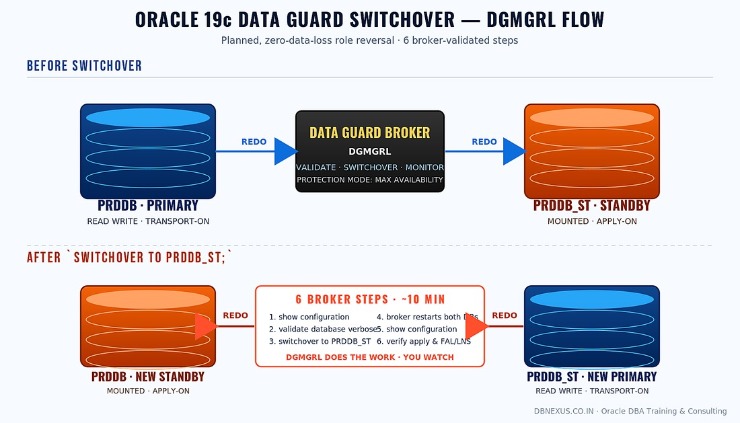 Oracle 19c Data Guard switchover with DGMGRL — six broker-validated steps, ~10 minutes wall clock.
Why DGMGRL Beats the Manual SQL*Plus Path
You can run a switchover by hand with ALTER DATABASE COMMIT TO SWITCHOVER TO ... — and most legacy runbooks still do. The trouble: every state check, every log shipping verification, every redo gap, every parameter sync is on you. Miss one step and you rebuild the standby from scratch. The Data Guard broker collapses all of that into a single command, validates configuration drift before it lets you proceed, restarts both databases, and reverses redo transport automatically. It is also the only path Oracle MAA actively documents for 19c and later.
Operationally, the broker gives you three things SQL*Plus does not: a single namespace for the whole Data Guard configuration, deterministic role transitions, and a verbose pre-flight that catches problems before they bite. If your shop is still on manual switchovers, this is the upgrade with the highest ratio of impact to effort.
Pre-Switchover Pre-Flight Checks (Do Not Skip)
Two short commands separate a clean switchover from a 2 AM rollback. Run them — every time — even when nothing has changed since yesterday.
Step 1: Confirm broker configuration state
$ dgmgrl sys/<pwd>@PRDDB
DGMGRL> show configuration;

Configuration - prddb_dg

  Protection Mode: MaxAvailability
  Members:
    prddb     - Primary database
      prddb_st - Physical standby database

Fast-Start Failover:  Disabled

Configuration Status:
SUCCESS   (status updated 13 seconds ago)

-- Anything other than SUCCESS = stop. Investigate the WARNING/ERROR
-- before you even think about touching a switchover.
Step 2: Run VALIDATE DATABASE VERBOSE on the switchover target
DGMGRL> validate database verbose prddb_st;

  Database Role:     Physical standby database
  Primary Database:  prddb

  Ready for Switchover:  Yes
  Ready for Failover:    Yes (Primary Running)

  Capacity Information:
    Database    Instances        Threads
    prddb       1                1
    prddb_st    1                1

-- Watch for: redo transport gaps, log apply lag, missing standby
-- redo logs, parameter drift (db_recovery_file_dest_size etc.).
-- If 'Ready for Switchover' is anything but Yes, fix it first.
The VALIDATE DATABASE VERBOSE output is the single most under-used DGMGRL command in the field — Oracle MAA's own broker reference is unambiguous that this is the pre-flight you run before every planned role transition (see the Oracle 19c Data Guard Broker switchover documentation).
Performing the Switchover in 4 Lines
Once the pre-flight is green, the actual role reversal is anti-climactic. From the same broker session:
DGMGRL> switchover to prddb_st;

Performing switchover NOW, please wait...
Operation requires a connection to database "prddb_st"
Connecting ...
Connected to "prddb_st"
Connected as SYSDBA.
New primary database "prddb_st" is opening...
Operation requires start up of instance "PRDDB" on database "prddb"
Starting instance "PRDDB"...
Connected to an idle instance.
ORACLE instance started.
Connected to "prddb"
Database mounted.
Connected to "prddb"
Switchover succeeded, new primary is "prddb_st"
DGMGRL>

-- The broker has: (1) frozen redo on old primary,
-- (2) flushed pending redo to standby, (3) converted standby->primary,
-- (4) restarted old primary as standby, (5) re-pointed redo transport.
That single command is doing the work a 40-step manual runbook used to do — and it is doing it in the order Oracle MAA tested. Trust the broker. If you need to switch back, you simply repeat the command with the original primary name.
🎥 Want to see this end-to-end on a live lab? Browse the full DBNexus YouTube channel for the Oracle 19c Data Guard switchover dgmgrl tutorial series — setup, broker configuration, switchover, failover, and reinstate — all demonstrated on a real two-node lab. Subscribe for new Data Guard and 26ai walkthroughs every week.
Every cohort at DBNexus Training & Consulting runs this exact switchover drill on a real two-node 19c lab — including the deliberately-broken scenarios below — so that your first production role transition is the third one you have already done.
When Switchover Fails Mid-Run — The 3 Recovery Paths
The broker is good. It is not magic. The three scenarios that bite production teams:
Network blip during the role transition. The broker leaves both databases in a clean intermediate state. Re-connect to the original primary, run show configuration; — if the operation is marked IN PROGRESS, give it 60 seconds, then re-issue the same SWITCHOVER command. The broker is idempotent here.
Standby redo log shortage on the (about-to-be) primary. Pre-flight will catch this, but if you skipped it, the switchover aborts mid-flight. Add the missing SRLs on the target standby (size = online redo log size + 1), restart apply, retry.
Parameter drift — typically log_archive_dest_n or fal_server. Fix it with EDIT DATABASE ... SET PARAMETER inside DGMGRL — Oracle 19c took manual SQL*Plus parameter editing off the supported path. Use the broker.
Post-Switchover Verification That Actually Matters
After Switchover succeeded prints, you are not done. A 60-second sanity sweep on both nodes saves a 4 AM page later:
-- On the NEW primary (former standby):
SQL> select db_unique_name, database_role, open_mode, protection_mode
       from v$database;

DB_UNIQUE_NAME   DATABASE_ROLE     OPEN_MODE             PROTECTION_MODE
---------------  ----------------  --------------------  -----------------
prddb_st         PRIMARY           READ WRITE            MAXIMUM AVAILABILITY

-- On the NEW standby (former primary):
SQL> select database_role, open_mode from v$database;
DATABASE_ROLE     OPEN_MODE
----------------  ---------------
PHYSICAL STANDBY  MOUNTED

-- Apply lag check (DGMGRL):
DGMGRL> show database prddb 'TransportLagThreshold';
DGMGRL> show database prddb 'ApplyLagThreshold';
-- Both should be 0 within a minute on a healthy network.

-- Confirm application services moved over:
$ srvctl status service -d prddb_st
-- All listed services should be RUNNING on the new primary.
If apply lag stays above zero for more than two minutes, check v$archive_dest_status on the new primary — eight times out of ten the issue is a stale log_archive_dest_state_2 = DEFER left over from the previous role. Re-enable it through DGMGRL, not SQL*Plus, to keep the broker view consistent. For the deeper broker model and why this matters in 23ai/26ai, the Oracle 26ai vs 19c breakdown covers what changes in the role-transition surface.
What to Do This Week
Run show configuration and validate database verbose against your production Data Guard config — today. Document what you find.
Schedule a non-production switchover drill in the next 14 days. Time it. Measure the actual wall clock from SWITCHOVER TO to applications reconnecting.
Audit standby redo logs on both sides — count and size must match online redo logs +1. This is the #1 cause of failed switchovers in 19c.
Replace every SQL*Plus alter system line in your Data Guard runbook with the DGMGRL edit database equivalent.
Cross-train one teammate on DGMGRL by next month. Single-DBA Data Guard knowledge is an SLO risk, not an asset.
For the broker setup steps that come before this — building the Data Guard configuration from scratch — Tim Hall's Oracle-Base 19c Data Guard Broker setup is still the cleanest external reference.
Oracle 19c Data Guard Switchover FAQ
How long does a typical Oracle 19c Data Guard switchover take with DGMGRL?
On a healthy two-node single-instance configuration with zero apply lag, a broker-driven switchover completes in 60–180 seconds of database operation, plus another two to three minutes for applications to fully reconnect through SCAN/services. Most production DR drills budget 10 minutes end-to-end to include verification.
Is the DGMGRL switchover command the same in Oracle 23ai and 26ai?
Yes. The SWITCHOVER TO <db_unique_name> syntax and the pre-flight commands (show configuration, validate database verbose) are unchanged from 19c through 23ai and 26ai. PDB-level Data Guard in 26ai adds new options, but the database-level role transition still uses the same command — which is why this muscle memory pays compounding dividends.
What is the difference between Data Guard switchover and failover?
Switchover is a planned, zero-data-loss, reversible role reversal initiated when both databases are healthy — used for maintenance, patching, and DR drills. Failover is an unplanned promotion of the standby to primary after the primary has become unavailable, may incur data loss depending on protection mode, and requires reinstating the former primary afterward. You practice switchovers so you never have to learn failover the hard way.
Do I need an Active Data Guard license to run DGMGRL switchovers?
No. Data Guard Broker and DGMGRL are part of Oracle Database Enterprise Edition — no extra license required for a basic physical-standby switchover. Active Data Guard is only required if you open the standby READ ONLY WITH APPLY for queries or use Far Sync instances, real-time query, or fast-start failover with certain features.
What is the most common reason DGMGRL switchover fails on Oracle 19c?
By a wide margin: insufficient or missing standby redo logs on the target standby. The broker validates this in validate database verbose, but only if you actually run it. Standby redo log count must be equal to (online redo log groups + 1), and the size must match the online redo log size exactly. Mismatched SRLs are the silent killer of switchover drills.
Ready to ship Data Guard switchovers in production? Train with DBNexus.
DBNexus Training & Consulting (formerly Oracle DBA Online Training) runs live, instructor-led Oracle DBA programs covering Data Guard, RAC, RMAN, GoldenGate, OEM 24ai, and 26ai upgrades. Real labs. Real production scenarios. Recorded sessions. Lifetime access. The same broker commands above are part of the standard Data Guard module — practiced until they are reflex.
Hands-on labs on a real two-node 19c Data Guard configuration — physical standby, broker, switchover, failover, reinstate
Production scenarios: redo gaps, network partitions, role-transition recovery, Far Sync, FSFO
1000+ DBAs trained globally across India, US, UK, UAE, Singapore, and Australia
Interview prep + CV review with senior MAA consultants — Data Guard interview questions covered separately
Flexible morning, evening, and weekend batches in IST
Subscribe to the DBNexus YouTube channel for 200+ free Oracle tutorials including the full Data Guard 19c playlist
📞 CALL NOW: +91 8169158909 — talk to the DBNexus team directly about the next batch, fees, and a free demo session. (India, IST 9 AM–10 PM.)
👉 Enroll for Oracle DBA Training → · Visit DBNexus.co.in
Mention this post when you call — get a free demo session on the live Data Guard switchover lab, plus a complimentary DGMGRL cheat-sheet PDF used by our enterprise consulting clients.
Become a production-ready Oracle DBA
Live weekend batches, recorded courses and on-job support — Oracle 19c, RAC, Data Guard, GoldenGate and Oracle AI Database 26ai.