Kill Blocking Sessions in Oracle 19c & 23ai/26ai — The 60-Second DBA Playbook (with MAX_IDLE_BLOCKER_TIME)
By DBNexus Editorial Team · Oracle DBA
Published May 25, 2026 · 7 min read
A single misbehaving session can freeze a Tier-1 application in under a minute. Oracle's V$SESSION view will tell you exactly who is holding the lock, who is waiting, and what SQL caused it — but only if you know which three queries to run. The same muscle memory carries from 19c all the way through 23ai and the new 26ai release, and it dovetails with the RAC troubleshooting workflow every senior DBA is expected to ship in production.
This post is the 60-second playbook: detect the blocker, decide whether to kill it, run the right ALTER SYSTEM KILL SESSION syntax for single-instance and RAC, verify the lock drained, then turn on Oracle's built-in automatic blocker killer so the same incident never wakes you up at 3 a.m. again.
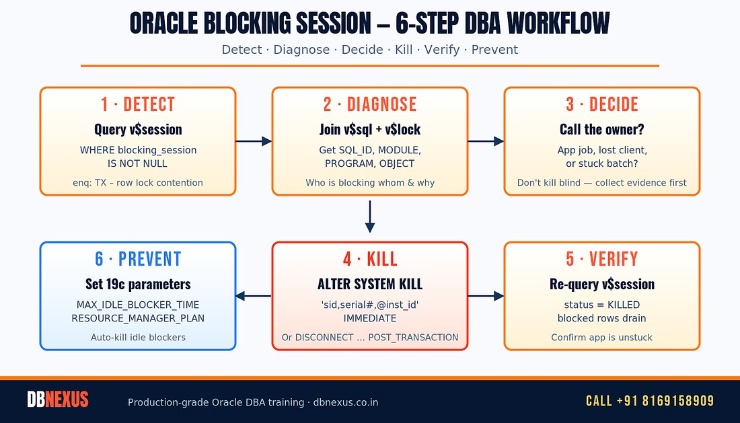 The 6-step DBA workflow for handling Oracle blocking sessions in 19c & 23ai.
How do you find a blocking session in Oracle 19c?
The fastest, dialect-correct query in 19c and 23ai joins V$SESSION to itself on the BLOCKING_SESSION column. That column is populated by the wait foreground process whenever a session is stuck on enq: TX – row lock contention, enq: TM – contention, or any library cache pin/lock event.
-- One-shot: who blocks whom, what they're running, how long it's been hurting
SELECT b.inst_id           AS blocker_inst,
       b.sid               AS blocker_sid,
       b.serial#            AS blocker_serial,
       b.username          AS blocker_user,
       b.osuser            AS blocker_os,
       b.machine           AS blocker_host,
       b.program           AS blocker_program,
       b.sql_id            AS blocker_sql_id,
       w.inst_id           AS waiter_inst,
       w.sid               AS waiter_sid,
       w.serial#            AS waiter_serial,
       w.username          AS waiter_user,
       w.event             AS waiter_event,
       w.seconds_in_wait   AS waited_secs,
       w.sql_id            AS waiter_sql_id
FROM   gv$session w
JOIN   gv$session b ON  b.sid       = w.blocking_session
                    AND b.inst_id   = w.blocking_instance
WHERE  w.blocking_session IS NOT NULL
ORDER  BY w.seconds_in_wait DESC;
Three things to read off this in the first ten seconds: the waiter_event tells you the lock class, waited_secs tells you how angry the app is, and the blocker_program almost always tells you whether it's a runaway batch (JDBC Thin Client + a job server), an abandoned laptop session (SQL*Plus + a dev machine), or an OS-level zombie. That's already enough to make the kill/wait decision without paging anyone.
Peek the blocker's last statement
Before you kill, grab the SQL text from V$SQL. This is what you'll paste into the post-mortem ticket.
SELECT sql_id, sql_fulltext, executions, last_active_time
FROM   gv$sql
WHERE  sql_id = '&blocker_sql_id'
AND    inst_id = &blocker_inst;
The right way to kill a blocking session
Oracle gives you three commands that look similar but behave very differently. Pick the wrong one and you either wait forever, leave a half-rolled-back transaction, or crash a dedicated server. Here is the production-grade decision tree.
-- 1. Soft kill — preferred when the blocker is mid-transaction and you can wait
ALTER SYSTEM DISCONNECT SESSION 'sid,serial#,@inst_id' POST_TRANSACTION;

-- 2. Hard kill — preferred when the blocker is idle or hung; rolls back immediately
ALTER SYSTEM KILL SESSION 'sid,serial#,@inst_id' IMMEDIATE;

-- 3. Force disconnect — kills the dedicated server process at OS level (last resort)
ALTER SYSTEM DISCONNECT SESSION 'sid,serial#,@inst_id' IMMEDIATE;
The IMMEDIATE keyword is the one that matters: without it, KILL SESSION merely asks the session to die at its next safe point and returns control to you instantly — meaning the lock can sit there for minutes longer. With IMMEDIATE, Oracle rolls back the transaction in the foreground and releases all locks before ALTER SYSTEM returns. For the full semantics and edge cases, see Oracle's Managing Processes guide and Tim Hall's killing-sessions reference.
If you'd rather build this muscle memory in a live lab against a real RAC cluster than from a blog post, DBNexus Training & Consulting (formerly Oracle DBA Online Training) runs hands-on Oracle 19c → 26ai cohorts where every student gets their own production-style sandbox and walks through exactly these blocker scenarios on day three.
RAC, gv$session, and the @inst_id trick
If you're running Oracle RAC, V$SESSION lies to you — it only shows the local instance. Always use GV$SESSION and look at both INST_ID and BLOCKING_INSTANCE. The @inst_id suffix on the kill command then routes the request to the correct node — no SSH-hopping, no remote sqlplus.
-- Kill SID 412 on instance 2 of the cluster, from any node
ALTER SYSTEM KILL SESSION '412,55891,@2' IMMEDIATE;

-- Or, see only inter-instance blockers (the dangerous ones)
SELECT inst_id, sid, blocking_instance, blocking_session, event
FROM   gv$session
WHERE  blocking_session IS NOT NULL
AND    inst_id <> blocking_instance;
Cross-instance blockers ride the cluster interconnect, so a single bad blocker can degrade every node simultaneously. The same diagnostic discipline that helps you explain RAC node eviction in an interview applies here: prove which instance owns the row, then kill on that instance.
What is MAX_IDLE_BLOCKER_TIME and how do I use it?
Oracle 19c (RU 19.6+) introduced MAX_IDLE_BLOCKER_TIME specifically so DBAs would stop being woken up by abandoned blocker sessions. It carries forward into 23ai and the new 26ai on-premises release unchanged. Set it at the system level, and Oracle will automatically terminate any session that has been idle and is blocking another session for longer than the threshold you configure.
-- Auto-kill any session idle for 15 minutes if and only if it is blocking someone
ALTER SYSTEM SET MAX_IDLE_BLOCKER_TIME = 15 SCOPE = BOTH;

-- Belt and braces: also cap idle time globally to 60 minutes (independent of blocking)
ALTER SYSTEM SET MAX_IDLE_TIME = 60 SCOPE = BOTH;

-- Verify
SHOW PARAMETER MAX_IDLE
The trick is the idle predicate: a session that is actively running SQL is never killed, even if it's holding a row lock — Oracle assumes a running job is doing real work. Only abandoned sessions that have walked away from a COMMIT or ROLLBACK get cleaned up. This makes the parameter safe to enable on production OLTP without coordinating with app teams.
Why not just use profiles and IDLE_TIME?
Resource Manager and the legacy IDLE_TIME profile setting kill idle sessions regardless of whether they hold a lock — which means they happily reap connection-pool spares and cause ORA-02396 errors in healthy applications. MAX_IDLE_BLOCKER_TIME only fires when the session is actually hurting someone else. Ship both: a generous MAX_IDLE_TIME floor, and an aggressive MAX_IDLE_BLOCKER_TIME ceiling.
Verify and prevent — the day-after checklist
After every kill, run the same diagnostic query you started with. The blocker should be gone, seconds_in_wait for the former victims should be dropping, and V$LOCK should no longer show the held TM/TX enqueues. If a killed session lingers in STATUS = 'KILLED' for more than a few minutes, the dedicated server process is stuck rolling back — at that point the OS-level orakill (Windows) or kill -9 <spid> (Linux) is acceptable, but document it.
For a deeper dive into the wait-events your blocking-session diagnostics are riding on, this DB Time and Wait Events deep dive from the Oracle DBA Online Training channel is the cleanest 30-minute primer I've seen:
DB Time & Wait Events deep dive — Oracle DBA Online Training. Subscribe to the channel for new Oracle 19c → 26ai tutorials every week.
What to do this week
Save the gv$session join above as a SQL*Plus script (blockers.sql) and bind it to a one-letter alias.
On every production 19c+ database, set MAX_IDLE_BLOCKER_TIME=15 tonight — it is safe by design.
Add a daily AWR check for the enq: TX – row lock contention event under Top Foreground Events; any non-zero value gets reviewed.
Train your L1 on-call to gather sql_id, program, and machine before paging you — kills without evidence cause repeat incidents.
Stress-test your kill runbook on a non-prod node and time it: target sub-60-second mean-time-to-recover.
FAQ — Oracle blocking sessions, 2026 edition
Is ALTER SYSTEM KILL SESSION reversible?
No. Oracle rolls back the active transaction and there is no resurrection path. If the killed session was mid-DML, all uncommitted work is lost. For long-running batch jobs that have already done meaningful work, prefer DISCONNECT … POST_TRANSACTION so the work commits first, then the session ends.
Can I kill SYS or SYSTEM sessions?
You can, but think twice. A SYS-owned session is almost always a background process (DBWn, LGWR, MMON) or a critical maintenance job. Use V$PROCESS.PNAME to identify Oracle background processes — never kill those. SYSTEM-owned interactive sessions are usually safe to kill.
Does MAX_IDLE_BLOCKER_TIME work in Standard Edition?
Yes. Unlike Resource Manager (Enterprise Edition only), MAX_IDLE_BLOCKER_TIME is a core kernel parameter and works on every 19c+ edition, including SE2.
What happens to a blocker session after I kill it on a RAC node?
LMS releases the global cache locks and the row-level TX enqueue propagates across the interconnect almost immediately. Waiters on every node unblock. If a waiter still shows blocking_session populated 30 seconds later, you killed the wrong session — re-run the GV$SESSION join.
Should I use OEM or SQL Developer instead of ALTER SYSTEM?
OEM and SQL Developer both wrap the same ALTER SYSTEM KILL SESSION call under the hood. The GUI is fine for daily ops, but the SQL is what you keep in the runbook — it survives version upgrades, console outages, and the on-call DBA who can't remember the OEM password at 2 a.m.
Ready to ship blocking-session diagnostics in production? Train with DBNexus.
DBNexus Training & Consulting (formerly Oracle DBA Online Training) runs live, instructor-led Oracle DBA programs covering production session management, lock diagnostics, RAC tuning, Data Guard, RMAN, AutoUpgrade, and the new 26ai features end-to-end. Real labs. Real production scenarios. Every session recorded. Lifetime access.
Hands-on labs on a dedicated 19c → 26ai RAC cluster — kill real blockers, watch real wait events drain.
Production scenarios pulled from active client engagements: locks, RAC node evictions, Data Guard failovers, ORA-04031 fires.
1,000+ DBAs trained globally and placed at Fortune 500 banks, telecoms, and consulting firms.
Interview prep + CV review for senior Oracle DBA roles in India, US, UK, and the Gulf.
Flexible batches — IST and EST weekend cohorts, with lifetime access to recordings.
Subscribe to the Oracle DBA Online Training YouTube channel for 200+ free tutorials.
📞 CALL NOW: +91 8169158909 — talk to the DBNexus team directly about the next batch, fees, and a free demo session. (India, IST 9 AM – 10 PM.)
👉 Enroll for Oracle DBA Training → · Visit DBNexus.co.in
Mention this post when you call — free demo session on the blocking-session diagnostic lab, plus a downloadable copy of the production gv$session blockers.sql script used by senior DBAs at our partner banks.
Become a production-ready Oracle DBA
Live weekend batches, recorded courses and on-job support — Oracle 19c, RAC, Data Guard, GoldenGate and Oracle AI Database 26ai.