srvctl Cheat Sheet for Oracle 19c & 26ai RAC — 30 Production Commands Every DBA Must Know (2026)
By DBNexus Editorial Team · Oracle DBA
Published June 3, 2026 · 8 min read
Oracle's June 2026 RAC documentation refresh quietly settled an old DBA argument: srvctl is now the recommended way to manage every cluster resource — including PDBs — and the single-letter shortcuts you have muscle memory for are officially deprecated. If you still type 'srvctl status db -d racdb' out of habit, this is the cheat sheet that re-builds the muscle memory before your next P1 call. We will cover 30 commands that actually show up in Indian banking, OCI and ExaCC production work — grouped by resource type, version-aware for 19c / 23ai / 26ai, and paired with the exact one-liners we drill in the DBNexus RAC interview prep series. You will also see when to fall back to crsctl, how the 26ai PDB resourcification changes start/stop flows, and the three traps that silently break kill-blocking-session workflows on a RAC node.
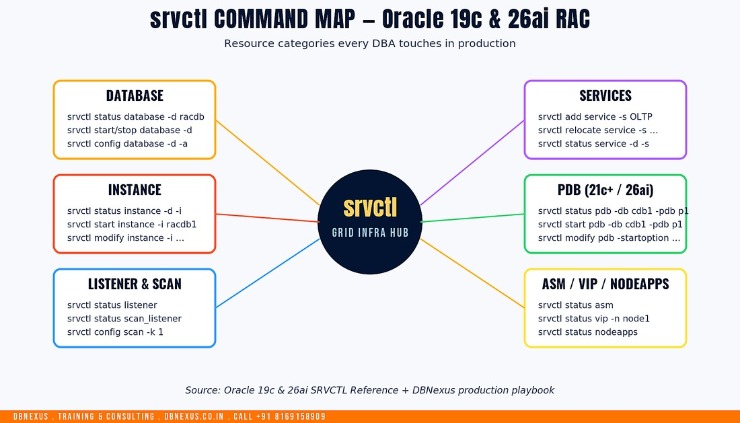 The srvctl command map every RAC DBA touches in production — six resource categories, one CLI.
Why srvctl deserves a cheat sheet in 2026
Three things changed between the 19c era and 26ai that make a refreshed reference worth printing and pinning to the cubicle wall. First, policy-managed databases are desupported in 26ai — admin-managed is the only path forward, which collapses several srvctl modify database flows you used to use. Second, PDB resourcification landed in 21c and is fully standardised in 23ai / 26ai: PDBs are now CRS resources, so srvctl start pdb actually moves the PDB through Clusterware instead of SQL*Plus. Third, Oracle has formally deprecated single-letter shortcuts — every command in this cheat sheet uses the full word form that the parser will keep accepting through the 26ai support window. The authoritative reference is the Oracle 26ai SRVCTL Reference, but knowing the doc tree and knowing what to type at 2 AM are different skills.
If your team is moving from 19c to 26ai in 2026, the DBNexus Training & Consulting (formerly Oracle DBA Online Training) RAC track is built around exactly this gap — live labs against a 3-node cluster where you run every command below until it is reflex, not lookup.
Database and instance srvctl commands you run every shift
These are the first eight commands a junior DBA must internalise. Run them as the oracle OS user (or grid where noted) — never as root, and never with a single-letter switch in 26ai.
# 1. Cluster-wide database status (the everyday default)
srvctl status database -database racdb -verbose

# 2. Status of a single instance on a single node
srvctl status instance -database racdb -instance racdb1 -verbose

# 3. Show full database configuration (spfile, oracle_home, role)
srvctl config database -database racdb -all

# 4. Start the whole database in open mode
srvctl start database -database racdb -startoption open

# 5. Start one instance only (rolling restart pattern)
srvctl start instance -database racdb -instance racdb1

# 6. Stop one instance immediately (no transactional drain)
srvctl stop instance -database racdb -instance racdb2 -stopoption immediate

# 7. Stop the whole database for a planned outage
srvctl stop database -database racdb -stopoption immediate -force

# 8. Disable a database from auto-start on the cluster
srvctl disable database -database racdb
The two flags people forget
The -force flag lets a stop succeed even when dependent services are still up — useful in an incident, dangerous in a change window. The -verbose flag turns a one-line status into the per-node breakdown you can actually paste into an INC ticket. Build both into your shell aliases on day one.
Services: the layer that decides where work runs
Application Continuity, TAF, FAN and connection-time load balancing all hang off srvctl service definitions. Get these wrong and every "the app is slow on node 2" ticket eventually lands on your desk.
# 9. Create an OLTP service pinned to node 1, with node 2 as failover
srvctl add service -database racdb \
  -service OLTP_SVC \
  -preferred racdb1 -available racdb2 \
  -policy AUTOMATIC \
  -failovertype SELECT -failovermethod BASIC \
  -clbgoal SHORT -rlbgoal SERVICE_TIME \
  -notification TRUE

# 10. Start / stop / status a service across the cluster
srvctl start service -database racdb -service OLTP_SVC
srvctl status service -database racdb -service OLTP_SVC
srvctl stop service -database racdb -service OLTP_SVC -force

# 11. Relocate a service to a different instance (zero-downtime move)
srvctl relocate service -database racdb \
  -service OLTP_SVC \
  -oldinst racdb1 -newinst racdb2 -force

# 12. Show full service config (preferred/available, policies, AC settings)
srvctl config service -database racdb -service OLTP_SVC
In 23ai / 26ai you can also create a -pdb-aware service in one command — the service starts and stops with the PDB through Clusterware, so the SQL ALTER SYSTEM dance is finally gone.
PDB management with srvctl — what 23ai and 26ai changed
Until 19c, you opened a PDB with SQL*Plus and lived with Clusterware not knowing about it. From 21c onwards, and standardised in Oracle AI Database 26ai, a PDB is a first-class CRS resource. That means start, stop, status and auto-restart go through srvctl pdb — the same way you manage a database or service.
# 13. Status of a single PDB across the cluster
srvctl status pdb -db cdb1 -pdb sales_pdb

# 14. Start a PDB on all CDB instances in OPEN READ WRITE
srvctl start pdb -db cdb1 -pdb sales_pdb -startoption open

# 15. Stop a PDB on one instance only
srvctl stop pdb -db cdb1 -pdb sales_pdb -node node2 -stopoption immediate

# 16. Set a PDB to auto-open whenever the CDB starts
srvctl modify pdb -db cdb1 -pdb sales_pdb -startoption open

# 17. Disable a PDB resource (planned maintenance)
srvctl disable pdb -db cdb1 -pdb sales_pdb
The trap: if Clusterware does not own the PDB resource, none of the above will work. After a non-CDB-to-PDB upgrade — for example the 19c non-CDB to 26ai PDB AutoUpgrade flow — re-register the PDB with srvctl add pdb before you cut over. We have seen at least three production cutovers stall on this exact step.
Watch the full RAC commands walkthrough — Session 27 from the DBNexus YouTube channel — for a live demo of every command above against a 19c / 26ai cluster.
Listener, SCAN, ASM and node apps — the always-on plumbing
This block runs as the Grid Infrastructure owner (typically grid), because the resources live in the GI home. If you only ever log in as oracle, half of these will fail with a permissions error — a classic interview red flag.
# 18. Local listener status on every node
srvctl status listener

# 19. SCAN listener and SCAN VIP status (run as grid)
srvctl status scan_listener
srvctl status scan

# 20. Show SCAN config (3 VIPs, port, endpoint)
srvctl config scan
srvctl config scan_listener

# 21. ASM status across all nodes
srvctl status asm -detail

# 22. Restart ASM on one node (drains disk group access first)
srvctl stop asm -node node1 -stopoption immediate -force
srvctl start asm -node node1

# 23. Node apps (VIP, ONS, network) status
srvctl status nodeapps

# 24. Verify node-level VIP is up
srvctl status vip -node node1
When to use crsctl instead
srvctl manages resources, but crsctl manages the cluster itself. If the GI stack is down, srvctl will not even start. Use crsctl stat res -t to see all CRS resources at once, and crsctl check cluster -all to confirm Clusterware itself is healthy — that distinction is what every RAC interview eventually asks about, as covered in our RAC node eviction interview guide.
Diagnostics and day-2 operations every DBA should automate
These six commands belong in a rac_health.sh wrapper that your monitoring tool runs every five minutes. They are also the same commands a Data Guard switchover playbook leans on — see the Oracle 19c Data Guard switchover lab for the broker side.
# 25. Get the environment variables a CRS resource starts with
srvctl getenv database -database racdb

# 26. Permanently change ORACLE_HOME for a database (after an opatchauto switch)
srvctl modify database -database racdb -oraclehome /u01/app/oracle/product/26.1.0/dbhome_1

# 27. List every database registered on the cluster
srvctl config database

# 28. Show every service and which instances it runs on
srvctl status service -database racdb -verbose

# 29. Find resources auto-started by Clusterware
srvctl config nodeapps -onsonly
srvctl config asm -detail

# 30. Convert a database resource to use a new SPFILE location after ASM migration
srvctl modify database -database racdb -spfile +DATA/RACDB/PARAMETERFILE/spfileracdb.ora
Three srvctl pitfalls we still see in 2026 production
Even seasoned DBAs trip on these. Write them on the wall next to the cheat sheet.
Running as the wrong OS user. Database and PDB commands belong to oracle; ASM, listener, SCAN and nodeapps belong to grid. A mismatched user is the #1 cause of mystery PRCR-1014 errors.
Stopping with -force during business hours. Force-stopping a service kills active transactions and bypasses Application Continuity drain. Use a planned relocate service with TAF and let connections re-attach.
Forgetting to add the PDB resource after a plug-in. If you plug a PDB into a CDB without srvctl add pdb, Clusterware will not auto-open it on the second node — and your weekend page will be exactly that.
Your srvctl muscle-memory drill for this week
Replace every single-letter srvctl alias in your .bash_profile with full-word commands.
Run all 30 commands above on a non-prod 19c RAC cluster and capture the output as a baseline.
If you run 23ai or 26ai, retire one SQL*Plus PDB open/close script and replace it with the srvctl pdb equivalent.
Add srvctl status database -verbose, srvctl status service -verbose, and crsctl check cluster -all to your monitoring tool as health checks.
Bookmark the Oracle 19c SRVCTL Reference alongside the 26ai reference linked above.
FAQ — srvctl in Oracle 19c and 26ai RAC
What is the difference between srvctl and crsctl?
srvctl manages registered CRS resources — databases, instances, services, listeners, PDBs, ASM. crsctl manages the Clusterware itself, including the underlying CRS daemons, voting disks and OCR. As a rule, if Grid Infrastructure is down, you reach for crsctl first.
Are single-letter srvctl options still valid in 26ai?
Yes, but they are formally deprecated. Oracle keeps them working through the 26ai support window. Production scripts written today should use the full-word form (-database, -instance, -service) so they survive the next major release.
Can I manage PDBs with srvctl on Oracle 19c?
Only partially. The full srvctl pdb verb set arrives in 21c and is the standard in 23ai / 26ai. On 19c, most teams still open and close PDBs through SQL*Plus or AFTER STARTUP triggers — the srvctl PDB hooks exist but are limited.
Why does srvctl say PRCR-1014: failed to start resource?
Almost always a permissions or OS-user issue. Confirm that the right user is running the command (oracle for DB resources, grid for GI resources), then check crsctl stat res -t to see whether the resource is in INTERMEDIATE or OFFLINE state and why. The Clusterware alert log under $GRID_BASE/diag/crs/<node>/crs/trace usually has the precise root cause.
Does srvctl work the same on ExaCC and OCI Base Database?
Functionally yes — the CLI is identical because both run real Oracle Grid Infrastructure under the hood. Cloud platforms add automation around it (the dbcli on ExaCC, console actions on Base DB), but at the OS level you still drop into srvctl for any non-trivial change.
Ready to ship srvctl confidence in production? Train with DBNexus.
DBNexus Training & Consulting runs live, instructor-led Oracle DBA programs covering RAC, Data Guard, RMAN, GoldenGate, OEM 24ai, performance tuning and Oracle AI Database 26ai. Real labs against multi-node 19c and 26ai clusters. Real production scenarios. Recorded sessions. Lifetime access for every cohort member.
Hands-on labs on a live 3-node RAC cluster — every command in this cheat sheet, drilled until it is muscle memory
Production scenarios: node eviction, instance crash recovery, service relocate under load, 26ai PDB resourcification
1000+ DBAs trained globally — alumni at HCL, Wipro, Infosys, Capgemini, TCS, Accenture and OCI partners
Interview prep, mock interviews and CV review for senior Oracle DBA roles in India, the Gulf, the UK and the US
Flexible weekday and weekend batches — IST mornings, evenings and weekend mornings
Subscribe to the DBNexus YouTube channel for 200+ free Oracle DBA tutorials including the full RAC command series
📞 CALL NOW: +91 8169158909 — talk to the DBNexus team directly about the next
batch, fees and a free demo. (India, IST 9 AM – 10 PM.)
👉 Enroll for Oracle DBA Training → · Visit DBNexus.co.in
Mention this post when you call — free demo session on the live 3-node srvctl + crsctl RAC lab, with a printable PDF of all 30 commands.
Become a production-ready Oracle DBA
Live weekend batches, recorded courses and on-job support — Oracle 19c, RAC, Data Guard, GoldenGate and Oracle AI Database 26ai.