Oracle AI Database 26ai On-Premises: What DBAs Need to Know About the May 2026 Linux x86-64 Release
By DBNexus Editorial Team · Oracle DBA
Published May 22, 2026 · 6 min read
Oracle has confirmed Oracle AI Database 26ai is coming to on-premises Linux x86-64 platforms, and as part of the quarterly Release Update 23.26.1, it brings hundreds of new features that materially change the daily life of a DBA. If you run 19c or 23ai in production today, this is the release that decides your next two upgrade cycles.
This guide cuts through the marketing and gives you the engineer's view: what is actually new, which features matter for production DBAs, what the new monthly CSPU patching cadence means for your maintenance windows, and the smartest path to get from where you are today to 26ai.
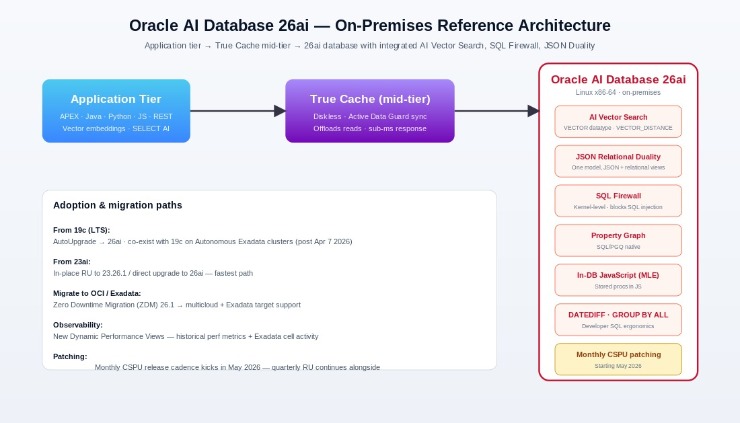 Reference architecture: how 26ai's new capabilities slot into a typical 3-tier on-premises stack.
1. What is Oracle AI Database 26ai (and how it relates to 23ai)
26ai is the next long-term support release after 23ai. Functionally it is a superset of 23ai: the same JSON Relational Duality, Property Graph, SQL Firewall and AI Vector Search foundation, plus a year of additional optimizer, security, and developer-ergonomics work. The on-premises Linux x86-64 build ships inside the 23.26.1 quarterly Release Update — the same RU stream 23ai customers already consume — so your upgrade tooling and patching infrastructure carry over.
If you have been waiting before adopting 23ai in production, you can skip straight to 26ai. Oracle has explicitly designed the 23ai → 26ai path as an in-place RU. Customers still on 19c (the previous LTS) get a clean AutoUpgrade-driven path; this is the upgrade the majority of enterprises are now planning.
2. The features DBAs and developers will actually use
GROUP BY ALL — finally
Anyone who has written a long analytical query has hit the maddening ORA-00979: not a GROUP BY expression error after adding a single column. 26ai introduces GROUP BY ALL, which tells Oracle to group by every non-aggregated column in the SELECT list automatically:
-- 26ai: no more maintaining a parallel GROUP BY list
SELECT region, product_line, channel,
       SUM(revenue) AS total_revenue,
       AVG(margin)  AS avg_margin
FROM   sales
WHERE  fiscal_year = 2026
GROUP BY ALL;
Why it matters: less error-prone refactors, faster prototyping in SQL Developer, cleaner BI views.
DATEDIFF down to the nanosecond
Oracle finally has a first-class DATEDIFF function with unit support all the way from years to nanoseconds. The old EXTRACT / interval arithmetic gymnastics are gone:
SELECT order_id,
       DATEDIFF(MINUTE,  order_created_at, payment_received_at) AS minutes_to_pay,
       DATEDIFF(DAY,     order_created_at, fulfilled_at)        AS days_to_fulfill,
       DATEDIFF(MONTH,   first_order_at,   SYSTIMESTAMP)        AS customer_age_months
FROM   orders
WHERE  fulfilled_at IS NOT NULL;
AI Vector Search, now production-grade
AI Vector Search shipped in 23ai but matures in 26ai with optimizer improvements, better HNSW/IVF index management, and tighter integration with SELECT AI for natural-language-to-SQL. The pattern that has become the de-facto enterprise RAG primitive looks like this:
-- store an embedding alongside relational data
CREATE TABLE kb_articles (
    id          NUMBER PRIMARY KEY,
    title       VARCHAR2(400),
    body        CLOB,
    embedding   VECTOR(1024, FLOAT32)
);

-- HNSW vector index
CREATE VECTOR INDEX kb_articles_vec_idx ON kb_articles(embedding)
ORGANIZATION INMEMORY NEIGHBOR GRAPH
DISTANCE COSINE WITH TARGET ACCURACY 95;

-- semantic search in pure SQL
SELECT id, title
FROM   kb_articles
ORDER  BY VECTOR_DISTANCE(
    embedding,
    VECTOR_EMBEDDING(ALL_MINILM_L12_V2 USING :user_question AS data),
    COSINE)
FETCH APPROX FIRST 5 ROWS ONLY;
True Cache: less work for the primary
True Cache — a diskless, automatically-synced read cache positioned between the app tier and the primary database — gets meaningful improvements in 26ai. The cache stays consistent through Active Data Guard redo apply, so reads can be safely offloaded without application changes. This is the lever to pull before scaling out a busy single-instance database.
SQL Firewall and security posture
SQL Firewall is built into the database kernel — not a bolt-on — and enforces per-user allow-lists at parse time. In 26ai, allow-list capture and enforcement workflows are easier to operationalize:
-- capture trusted SQL for a user (run during a representative window)
BEGIN
  DBMS_SQL_FIREWALL.CREATE_CAPTURE(
    username          => 'APP_USER',
    top_level_only    => TRUE,
    start_capture     => TRUE);
END;
/

-- generate and enable the allow-list
BEGIN
  DBMS_SQL_FIREWALL.STOP_CAPTURE(username => 'APP_USER');
  DBMS_SQL_FIREWALL.GENERATE_ALLOW_LIST(username => 'APP_USER');
  DBMS_SQL_FIREWALL.ENABLE_ALLOW_LIST(
    username          => 'APP_USER',
    enforce           => DBMS_SQL_FIREWALL.ENFORCE_ALL,
    block             => TRUE);
END;
/
3. Monthly CSPUs — your patching calendar just changed
Starting May 2026, Oracle is moving Critical Security Patch Updates (CSPUs) to a monthly cadence. Quarterly Release Updates (RUs) continue, but security-only fixes now arrive every month — much closer to the Linux distro cadence DBAs already manage.
Plan a monthly maintenance window. Even 30 minutes on Saturday night for one CDB will pay off.
Standardize on opatchauto. Manual datapatch runs will not scale at this cadence — automate.
Stagger Dev → QA → Prod. The shorter cycle means each environment must move faster, not all at once.
Use Fleet Patching & Provisioning (FPP) or OEM 24ai job templates so you are not babysitting nodes.
4. Upgrade paths: 19c, 23ai, OCI, Exadata
There are four realistic starting points. Pick yours:
From 19c (most enterprises)
Stay on 19c through its premier support window and use this year to validate 26ai in a non-prod estate. Use AutoUpgrade — it now natively understands 26ai targets:
# 1. Analyze
java -jar autoupgrade.jar -config upg26.cfg -mode analyze

# 2. Fix-ups
java -jar autoupgrade.jar -config upg26.cfg -mode fixups

# 3. Deploy (cutover)
java -jar autoupgrade.jar -config upg26.cfg -mode deploy
From 23ai
Lucky you. 23ai → 26ai is an in-place RU using opatchauto apply followed by datapatch -verbose. Schedule it like any other quarterly RU.
To OCI / Exadata
Use Zero Downtime Migration (ZDM) 26.1, which now supports multicloud targets and Exadata. ZDM handles online instantiation and switchover; you can move from on-prem 19c straight to OCI 26ai in one orchestrated job.
Need this orchestrated end-to-end with a guide rather than docs? DBNexus Training & Consulting (formerly Oracle DBA Online Training) runs live AutoUpgrade and ZDM labs as part of every Oracle DBA cohort — you upgrade real databases under instructor supervision before you touch production.
5. Observability gets better in 26ai
New Dynamic Performance Views expose historical statistical summaries of system metrics and Exadata cell activity directly from the database — no Enterprise Manager required for the basics. Trend analysis and performance baselining become a SQL problem, not a tooling problem.
-- example: surface 24-hour CPU and IO trend without OEM
SELECT snap_time,
       ROUND(AVG(cpu_pct), 1)            AS avg_cpu_pct,
       ROUND(AVG(io_throughput_mbps), 1) AS avg_io_mbps
FROM   v$sys_metric_summary_history
WHERE  snap_time > SYSTIMESTAMP - INTERVAL '1' DAY
GROUP BY ALL
ORDER BY snap_time;
6. What to do this week
Download the 23.26.1 RU notes and grep for anything touching features you depend on (Result Cache, In-Memory, AQ, Data Guard).
Stand up a 26ai sandbox on a Linux x86-64 VM and load a copy of one real schema.
Run AutoUpgrade in analyze mode against your highest-value 19c databases — the report alone is gold for project planning.
Draft a monthly CSPU calendar and socialize it with app teams before they discover it themselves.
Pick one workload — a hot read path — and POC True Cache. It is the easiest 26ai win you can demo to leadership.
Ready to ship 26ai in production? Train with DBNexus.
DBNexus Training & Consulting (formerly Oracle DBA Online Training) runs live, instructor-led Oracle DBA programs covering everything in this article — 19c, 23ai, 26ai, AutoUpgrade, RAC, Data Guard, RMAN, GoldenGate, OCI, AI Vector Search, True Cache, SQL Firewall and the monthly CSPU workflow. Real lab environments. Real production scenarios. Recorded sessions and lifetime access.
Hands-on labs on real RAC clusters, Data Guard standbys and 26ai sandboxes — not slides.
Production-style scenarios: upgrades, patching, performance tuning, backup & recovery, failover drills, OCI migration.
1000+ DBAs trained working at enterprises across India, the US, UK, Singapore and the Middle East.
Interview prep + CV review included — so the training translates directly into a higher-paying role.
Flexible weekend & weekday batches — join the cohort that fits your schedule and timezone.
📞 CALL NOW: +91 8169158909 — talk to our team directly about the next Oracle DBA batch, course content, fees and demo class. (India, IST 9 AM–10 PM.)
👉 Enroll for Oracle DBA Training → · Visit DBNexus.co.in
Early-bird seat for the next batch? Mention this post when you call — we will block a free demo session for you on the 26ai upgrade lab.
Written by - DBNexus Training & Consulting (formerly Oracle DBA Online Training). 15+ years as a production Oracle DBA across banking, telecom and SaaS. Trained 1000+ DBAs worldwide.
Become a production-ready Oracle DBA
Live weekend batches, recorded courses and on-job support — Oracle 19c, RAC, Data Guard, GoldenGate and Oracle AI Database 26ai.