Recover a Dropped Table in Oracle 19c & 26ai — RMAN Table-Level PITR Lab in 20 Minutes (2026)
By DBNexus Editorial Team · Oracle DBA
Published May 30, 2026 · 8 min read
Friday, 4:47 PM. A junior dev runs DROP TABLE HR.EMP_BONUS PURGE; in production instead of the dev clone. Two hundred rows of payout data — five hours' worth of HR work — gone. The flashback recycle bin is empty because PURGE skipped it. The database is still open. Users are still working. You have a backup from last night and every archivelog since.
This is the moment RMAN table-level point-in-time recovery was built for. One command, one auxiliary instance Oracle spins up for you, and the lost table comes back at the exact second before the DROP — without a restore of the whole database, without downtime, and with the same syntax across 19c, 23ai and 26ai. If you have already drilled the muscle memory for killing blocking sessions in 60 seconds and Data Guard switchover with DGMGRL, this is the third reflex every Oracle DBA should own. The walkthrough below is the lab version — copy-paste runnable — plus the gotchas I see in real Oracle 26ai on-premises environments.
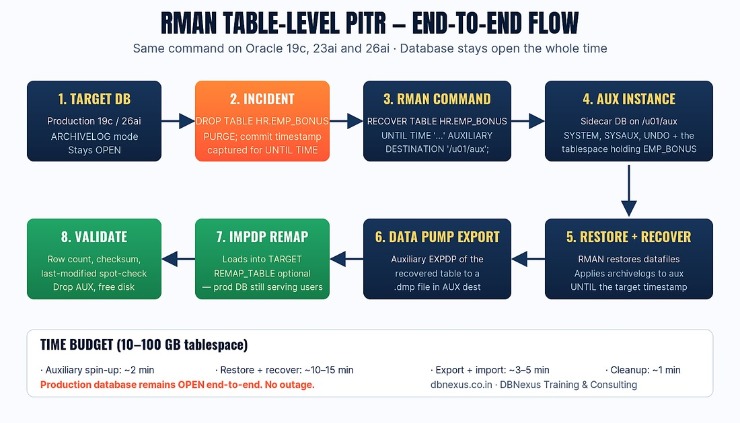 End-to-end RMAN table-level PITR flow — works identically on Oracle 19c, 23ai and 26ai.
When does RMAN table-level PITR beat Flashback?
Flashback Table is fast, but it only works while the dropped object is still in the recycle bin and only as far back as the UNDO_RETENTION window allows. Flashback Database needs DB_FLASHBACK_RETENTION_TARGET set in advance and a flash recovery area with enough space — and it reverts the entire database, not one table. Neither works for the PURGE case or for a logical mistake committed days ago.
RMAN RECOVER TABLE (introduced in 12c, hardened in 19c, polished in 23ai and 26ai) sidesteps both limits. It uses your existing RMAN backups and archivelogs — the same ones you use for disaster recovery and 26ai upgrades — to spin up a private auxiliary database, recover the table to a point in time, export it with Data Pump, import it back into your production database, and tear the auxiliary down. The production database never closes. It is the cleanest "single-table rewind" Oracle ships.
Prerequisites — non-negotiable
Target database is in ARCHIVELOG mode (check with SELECT log_mode FROM v$database;).
You have RMAN backups that cover the recovery target time, plus every archivelog since.
Free disk on the auxiliary destination ≥ size of SYSTEM + SYSAUX + UNDO + the tablespace holding the dropped table (rule of thumb: 2× the dropped tablespace).
Tablespace was not a SYSTEM/SYSAUX object and was not part of an active STANDBY until-the-second sync (Oracle blocks PITR on these — see MOS doc 2391959.1).
The exact RMAN command (works on 19c, 23ai, 26ai)
Capture the target time first. The cleanest way is to grab it from your alert log or the audit trail. If you only know "about 4:47 PM," round backwards by 30 seconds — Oracle will replay forward, but it cannot rewind from a future SCN. Pro tip from the labs we run at DBNexus Training & Consulting (formerly Oracle DBA Online Training): paste the target time as a literal string with the matching NLS format. Implicit conversions are how PITR jobs fail at 11 PM.
-- 1. Capture the target time BEFORE the DROP
ALTER SESSION SET NLS_DATE_FORMAT='YYYY-MM-DD HH24:MI:SS';
SELECT TO_CHAR(SYSDATE,'YYYY-MM-DD HH24:MI:SS') AS now_ts FROM dual;
-- copy the value, subtract a few seconds, save it.

-- 2. Connect to RMAN against the LIVE target — DB stays open
$ rman target / log=/u01/aux/rman_pitr_emp_bonus.log

-- 3. Run the one-command recovery
RUN {
  SET UNTIL TIME "TO_DATE('2026-05-27 16:46:30','YYYY-MM-DD HH24:MI:SS')";
  RECOVER TABLE HR.EMP_BONUS
    AUXILIARY DESTINATION '/u01/aux'
    REMAP TABLE 'HR'.'EMP_BONUS':'EMP_BONUS_RECOVERED';
}
That is it. RMAN does the heavy lifting: it provisions an auxiliary $ORACLE_HOME sidecar instance under /u01/aux, restores the minimum set of datafiles, applies archivelogs up to your target time, exports the table with Data Pump, imports it into your production database as HR.EMP_BONUS_RECOVERED, then drops the auxiliary. The REMAP TABLE clause is what saves you when the original table still exists and you only want to compare before merging.
Watch the live lab on the Oracle DBA Online Training YouTube channel — Part 1 of the Tablespace PITR walkthrough covers the same auxiliary-instance mechanics behind RECOVER TABLE.
What changed in Oracle 23ai and 26ai RMAN
The command did not change. The plumbing underneath did. Oracle's MAA team published the full 23ai RMAN feature list — three items matter for table-level PITR specifically:
Adaptive parallelism. RMAN now scales channels based on the auxiliary host's real-time CPU and I/O headroom rather than the static CONFIGURE PARALLELISM you set in 19c. On a busy box, expect the restore to run with fewer channels — and stop hurting the live workload.
AES-256 by default for encrypted backups. If you upgraded a backup configuration from 19c, CONFIGURE ENCRYPTION ALGORITHM silently moves from AES-128 to AES-256 on first 23ai/26ai backup. Re-test your RECOVER TABLE runbook against the new ciphers before you need it.
Immutable backups. 26ai lets you mark a tape or OCI Object Storage destination immutable for N days. PITR still reads them transparently — the ransomware-defense feature does not change the recovery command, only what RMAN refuses to DELETE OBSOLETE against.
None of this changes the muscle memory. If you can run RECOVER TABLE on 19c, you can run it on 26ai. That is also why the top 5 features every DBA must know in 26ai list focuses on what is genuinely new — AI Vector Search, JSON Duality, SQL Firewall — and leaves backup-and-recovery as the one area where 26ai mostly extends what already works.
Three places RMAN RECOVER TABLE still bites in production
1. The auxiliary destination silently fills the FRA
If you point AUXILIARY DESTINATION at a directory inside DB_RECOVERY_FILE_DEST, Oracle counts the auxiliary datafiles against your flash recovery area quota. On a database that is already at 85% FRA, the PITR job will hang halfway through restore with ORA-19809. Always use a separate filesystem — /u01/aux or /oracle/aux_pitr — never the FRA path.
2. Tablespaces with self-referencing constraints
If the dropped table has a foreign key into another table — or worse, a circular reference inside the same tablespace — RECOVER TABLE still works, but it imports only the recovered table. The FK constraints stay in DISABLED NOVALIDATE state on the import. The fix is a REMAP TABLE with a new name (as in the example above) and an explicit ALTER TABLE … ENABLE CONSTRAINT pass after you verify the row count matches expectation.
3. The DROP happened on a RAC instance — which node do you run from?
On Oracle RAC, RECOVER TABLE runs from any single node. Pick the node with the least workload — the auxiliary instance Oracle spins up will use that node's CPU and ORACLE_HOME. Do not try to parallelise the PITR across multiple instances; the auxiliary database is single-instance by design even when the target is RAC. The wider RAC error matrix — including node eviction during PITR — is its own discipline; if your sessions show gc cr block busy spikes during the recovery, that is the live workload, not the auxiliary.
Validating the recovered table — the checklist that closes the ticket
RMAN telling you the recovery succeeded is not enough. Three checks decide whether you tell the dev "we're good" or you escalate:
-- 1. Row count vs expectation
SELECT COUNT(*) FROM hr.emp_bonus_recovered;

-- 2. Hash-based row-level checksum (cheap, sampled)
SELECT
  ORA_HASH(LISTAGG(emp_id || '|' || bonus_amt, ',') WITHIN GROUP (ORDER BY emp_id))
    AS row_hash
FROM hr.emp_bonus_recovered
WHERE ROWNUM <= 10000;

-- 3. Last-modified spot check via the audit trail
SELECT current_user, action_name, sql_text, event_timestamp
FROM   unified_audit_trail
WHERE  object_name = 'EMP_BONUS'
AND    event_timestamp >= SYSTIMESTAMP - INTERVAL '24' HOUR
ORDER  BY event_timestamp DESC FETCH FIRST 20 ROWS ONLY;
If the row count matches the snapshot the application owner remembers — and the hash matches the value the dev recorded before the DROP — you are done. If either is off, do not merge EMP_BONUS_RECOVERED back into EMP_BONUS. Walk back the target time by 5 minutes and run RECOVER TABLE again to a slightly earlier point. The auxiliary destination cleans itself up between runs.
What to do this week
Run the lab on a dev database. Drop a test table, capture the timestamp, run RECOVER TABLE, validate. Twenty minutes once means the next time it happens in prod, the muscle memory is there.
Document your auxiliary destination. Pick a filesystem with at least 2× the largest tablespace, mount it on every DB host, and put the path into your runbook today.
Test against 26ai. If you have a 26ai sandbox from the on-prem 26ai release, run the same command there. Confirm AES-256 backups recover. Confirm parallelism behaves.
Add an alert. A DROP TABLE or TRUNCATE by anyone except the app schema owner is worth a PagerDuty page. The PITR is the safety net; the alert is the seatbelt.
Read the canonical doc. Oracle's own Performing RMAN TSPITR guide is the authoritative reference — bookmark it.
Frequently asked questions
Does RMAN RECOVER TABLE work on a pluggable database (PDB)?
Yes — from 12.2 onwards, and natively in 19c and 26ai. Connect with rman target sys/pw@CDB1 AS SYSBACKUP and Oracle will resolve the PDB from the object name. The auxiliary instance is created against the CDB, but only the target PDB's datafiles are restored.
How much disk does the auxiliary destination actually need?
Plan for the size of SYSTEM + SYSAUX + the active UNDO + the tablespace that holds the dropped table, plus 25% headroom. On a 100 GB application tablespace, that is typically 35–50 GB of free space.
Can I run it against a Data Guard standby instead?
No — RECOVER TABLE must run against the primary. If your primary is unavailable, do a DGMGRL switchover first, then run the table-level PITR against the new primary. The auxiliary instance cannot be created on a mounted-only standby.
What if the dropped table had LOB columns?
LOBs are fully supported. Data Pump exports SecureFile and BasicFile LOBs as-is. The only caveat: encrypted LOBs require the auxiliary instance to have access to the same wallet as the target — make sure WALLET_LOCATION or TDE_CONFIGURATION is reachable from the auxiliary destination path before you start.
How is this different from Flashback Table?
Flashback Table needs the dropped object in the recycle bin and the undo still intact — minutes to hours of horizon, depending on your UNDO_RETENTION. RMAN RECOVER TABLE works from backups and archivelogs, so the horizon is as long as your backup retention. Use Flashback first when it is fast enough; fall back to RMAN PITR when it is not, or when PURGE already cleared the recycle bin.
Ready to ship RMAN table-level PITR in production? Train with DBNexus.
DBNexus Training & Consulting (formerly Oracle DBA Online Training) runs live, instructor-led Oracle DBA programs covering RMAN, Backup & Recovery, RAC, Data Guard, GoldenGate, OEM 24ai and 23ai/26ai features. Real labs. Real production scenarios. Recorded sessions. Lifetime access.
Hands-on labs on real 19c and 26ai databases — including the exact RECOVER TABLE scenarios in this post.
Production scenarios pulled from live consulting engagements — not toy examples.
1,000+ DBAs trained globally across 19c, 23ai and 26ai cohorts.
Interview prep and CV review included — the same prep that got students into Oracle, Accenture, TCS and Capgemini.
Flexible weekend and weekday batches — IST, GST and EST friendly.
Subscribe to the Oracle DBA Online Training YouTube channel — 200+ free tutorials including the full RMAN series.
📞 CALL NOW: +91 8169158909 — talk to the DBNexus team directly about the next batch, fees and a free demo. (India, IST 9 AM–10 PM.)
👉 Enroll for Oracle DBA Training → · Visit DBNexus.co.in
Mention this post when you call — free demo session on the RMAN table-level PITR lab, run live against a 19c and a 26ai database in the same hour.
Become a production-ready Oracle DBA
Live weekend batches, recorded courses and on-job support — Oracle 19c, RAC, Data Guard, GoldenGate and Oracle AI Database 26ai.