Fix a Full Tablespace in Oracle 19c & 26ai — 5-Minute DBA Playbook (2026)
By DBNexus Editorial Team · Oracle DBA
Published June 8, 2026 · 6 min read
Ask any on-call Oracle DBA what woke them last month and ORA-01653: unable to extend is near the top of the list. One uncontrolled data load, a forgotten autoextend setting, or a runaway audit table, and a production tablespace hits 100% — inserts start failing and the application goes down. The good news: clearing a full tablespace is a five-minute job once you know the four levers. This playbook walks through every one of them for Oracle 19c and the new 26ai release, with copy-paste SQL. If a session is also holding things up while you work, keep our 60-second guide to killing blocking sessions nearby, and if the bloat came from data you can afford to lose, our RMAN table-level recovery lab pairs neatly with this one.
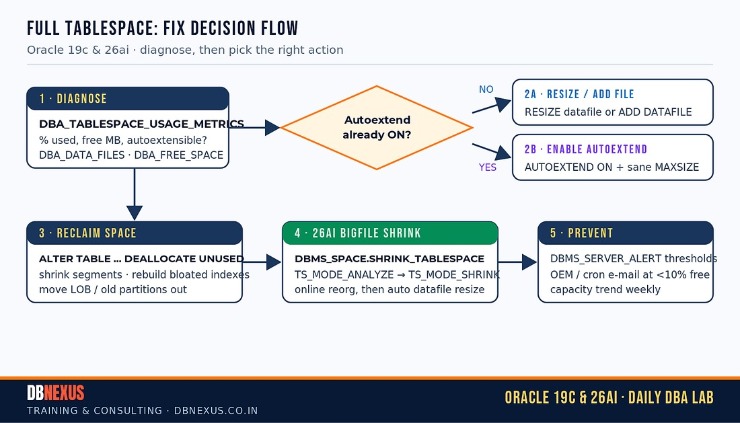 The full-tablespace decision flow: diagnose first, then pick resize, add-datafile, reclaim, or the new 26ai bigfile shrink.
First, diagnose: is the tablespace really full?
Before you touch anything, confirm what is actually full. A tablespace at 100% of its current size may still have headroom if its datafiles can autoextend. The fastest read in both 19c and 26ai is DBA_TABLESPACE_USAGE_METRICS, which already accounts for the maximum size each tablespace can reach.
-- 1) Fast "what is full?" check (19c & 26ai) -- % used vs. max possible size
SELECT tablespace_name,
       ROUND(used_percent, 1)                AS pct_used,
       ROUND(used_space      * 8192/1048576) AS used_mb,   -- assumes 8K block
       ROUND(tablespace_size * 8192/1048576) AS max_mb
FROM   dba_tablespace_usage_metrics
ORDER  BY used_percent DESC;
Anything north of ~90% needs attention. Next, look at the individual datafiles for the hot tablespace so you know whether you can simply let them grow:
-- 2) For a hot tablespace, see each datafile, its size, and headroom
SELECT file_name,
       ROUND(bytes/1048576)    AS size_mb,
       autoextensible          AS autoext,
       ROUND(maxbytes/1048576) AS max_mb     -- 0 / null means NO autoextend
FROM   dba_data_files
WHERE  tablespace_name = 'USERS'
ORDER  BY file_id;
If AUTOEXT is NO, that is usually your whole problem. From here, the fix you choose depends on whether you have disk to spare.
Fix #1 — Resize an existing datafile
When the filesystem or ASM disk group has room, growing a current datafile is the quickest possible fix — it is a single, instant DDL with no new files to manage:
-- Grow an existing datafile (instant if the disk has room)
ALTER DATABASE DATAFILE '/u02/oradata/PROD/users01.dbf' RESIZE 8G;
Resize is ideal for a smallfile tablespace that has just a couple of datafiles and plenty of underlying disk. If the resize itself errors about exceeding the maximum, you have hit the per-file limit and should move on to Fix #2.
Fix #2 — Add a datafile and turn AUTOEXTEND on
A smallfile tablespace can hold many datafiles, so when one file is maxed out you simply add another — and this time let it grow on its own with a sane ceiling so you never get paged for the same tablespace twice:
-- Add a new datafile that grows safely (smallfile tablespace)
ALTER TABLESPACE users
  ADD DATAFILE '/u02/oradata/PROD/users02.dbf'
  SIZE 2G AUTOEXTEND ON NEXT 256M MAXSIZE 16G;

-- Or flip autoextend ON for a file that was created with a fixed size
ALTER DATABASE DATAFILE '/u02/oradata/PROD/users01.dbf'
  AUTOEXTEND ON NEXT 256M MAXSIZE 16G;
Always set an explicit MAXSIZE. AUTOEXTEND ON with MAXSIZE UNLIMITED is how DBAs accidentally fill an entire mount point at 3 a.m. — bounding each file keeps a runaway query from taking the whole server with it.
At DBNexus Training & Consulting (formerly Oracle DBA Online Training) we drill exactly this muscle memory in the lab — trainees add datafiles, flip autoextend, and watch the alert clear on a live database before they ever touch production.
Fix #3 — Reclaim space without buying disk
Sometimes there is no spare disk and procurement is days away. You can often claw back space that segments are holding but not using. Bursty load jobs are a classic offender — see Oracle’s own ORA-01653 guidance for the underlying extent behaviour.
-- 3a) Give back space a load job grabbed above the high-water mark
ALTER TABLE sales.orders DEALLOCATE UNUSED;

-- 3b) Rebuild a bloated index INTO a less-full tablespace (online, 19c+)
ALTER INDEX sales.orders_pk REBUILD ONLINE TABLESPACE idx_new;
Moving a large index or LOB segment out to another tablespace is often the single biggest win on a system that has been running for years. Rebuilding online means the application keeps querying while you reclaim.
New in Oracle 23ai & 26ai: bigfile defaults and tablespace shrink
If you are already on the latest release — and our Oracle 26ai on-premises guide covers the rollout — the picture changes. In Oracle 23ai and 26ai, SYSTEM, SYSAUX and user tablespaces default to bigfile, so each tablespace is a single large datafile that you resize directly rather than adding more files. More importantly, 23ai/26ai finally let you shrink a bigfile tablespace online when the used space is far below the allocated size:
-- Oracle 23ai / 26ai: analyse first, then shrink the bigfile online
BEGIN
  -- ANALYZE mode only reports the smallest size you could shrink to
  DBMS_SPACE.SHRINK_TABLESPACE(
    tablespace_name => 'USERS',
    shrink_mode     => DBMS_SPACE.TS_MODE_ANALYZE);

  -- When the report looks right, run the real online shrink
  DBMS_SPACE.SHRINK_TABLESPACE(
    tablespace_name => 'USERS',
    shrink_mode     => DBMS_SPACE.TS_MODE_SHRINK);
END;
/
The procedure quietly reorganises objects within the datafile using online DDL and then resizes the file down for you — no more bigfile tablespaces that stay huge long after you dropped the data. Tim Hall’s bigfile tablespace shrink write-up on oracle-base.com has the full syntax and the TS_MODE_SHRINK_FORCE option for stubborn cases.
Stop the 2 a.m. page: monitor and alert
Every fix above is reactive. The DBAs who never get paged for space set a threshold once and let the database e-mail them long before 100%:
-- Warn at 85%, critical at 95%, for the USERS tablespace
BEGIN
  DBMS_SERVER_ALERT.SET_THRESHOLD(
    metrics_id         => DBMS_SERVER_ALERT.TABLESPACE_PCT_FULL,
    warning_operator   => DBMS_SERVER_ALERT.OPERATOR_GE, warning_value  => '85',
    critical_operator  => DBMS_SERVER_ALERT.OPERATOR_GE, critical_value => '95',
    observation_period => 1, consecutive_occurrences => 1,
    instance_name      => NULL,
    object_type        => DBMS_SERVER_ALERT.OBJECT_TYPE_TABLESPACE,
    object_name        => 'USERS');
END;
/
Pair this with Oracle Enterprise Manager notifications or a small cron job that runs query #1 and mails you anything below 10% free, and full-tablespace incidents quietly disappear from your week.
Prefer to watch the labs? Subscribe to our Oracle DBA Online Training YouTube channel for hands-on Oracle 19c and 26ai walkthroughs.
Do this on your databases this week
Run query #1 on every production database and note any tablespace above 85%.
Confirm every critical datafile has AUTOEXTEND ON with a bounded MAXSIZE.
Set DBMS_SERVER_ALERT thresholds (or OEM alerts) at 85% / 95%.
On 23ai/26ai, analyse one oversized bigfile tablespace with TS_MODE_ANALYZE.
Document the runbook so the next on-call DBA fixes it in five minutes too.
Frequently asked questions
How do I check which Oracle tablespace is full?
Query DBA_TABLESPACE_USAGE_METRICS and sort by USED_PERCENT. It reports usage against each tablespace maximum possible size, so it is accurate even when datafiles can still autoextend.
What is the difference between resizing and adding a datafile?
Resizing grows a file you already have and is instant when disk is available. Adding a datafile gives a smallfile tablespace a brand-new file, which you need once an existing file has hit its size limit.
Does Oracle 26ai create bigfile tablespaces by default?
Yes. In Oracle 23ai and 26ai, SYSTEM, SYSAUX and user tablespaces are bigfile by default, so you generally resize the single datafile rather than adding more files.
Can I shrink a tablespace in Oracle without downtime?
On 23ai/26ai, DBMS_SPACE.SHRINK_TABLESPACE reorganises objects with online DDL and resizes the datafile down, so the tablespace stays available throughout. Run TS_MODE_ANALYZE first to preview the result.
How do I stop ORA-01653 from happening again?
Enable AUTOEXTEND with a sensible MAXSIZE on every production datafile, set DBMS_SERVER_ALERT or OEM thresholds at 85% and 95%, and review tablespace growth trends weekly.
Ready to ship tablespace and storage fixes in production? Train with DBNexus.
DBNexus runs live, instructor-led Oracle DBA programs covering RAC, Data Guard, RMAN backup & recovery, performance tuning and 26ai. Real labs. Real scenarios. Recorded sessions. Lifetime access.
Hands-on labs on real Oracle 19c and 26ai databases
Production scenarios — full tablespaces, blocking sessions, recovery
10,000+ DBAs trained globally
Interview prep + CV review
Flexible weekday and weekend batches
👉 Enroll for Oracle DBA Training → · Visit DBNexus.co.in
Only a handful of seats remain in the next weekend batch — lock yours in before the next full-tablespace page finds you unprepared.
Become a production-ready Oracle DBA
Live weekend batches, recorded courses and on-job support — Oracle 19c, RAC, Data Guard, GoldenGate and Oracle AI Database 26ai.