Configure Fast-Start Failover in Oracle 19c & 26ai Data Guard — Hands-On DGMGRL Lab (2026)
By DBNexus Editorial Team · Oracle DBA
Published June 8, 2026 · 5 min read
A switchover is planned. A failover is not. When your Oracle primary dies at 2 a.m., the real question is not whether you can run a FAILOVER command — it is whether anyone is awake to run it. Fast-Start Failover (FSFO) answers that by handing the decision to an independent Observer process that promotes your standby automatically, often in under 30 seconds. If you have already worked through our Data Guard switchover lab and you are comfortable in DGMGRL, FSFO is the natural next step from manual DR to hands-off high availability. This lab configures FSFO end-to-end on Oracle 19c, and the same broker workflow carries straight into Oracle 26ai on-premises. Pair it with a tested RMAN table-level recovery, and you have covered both the "lose the database" and "lose one table" failure modes.
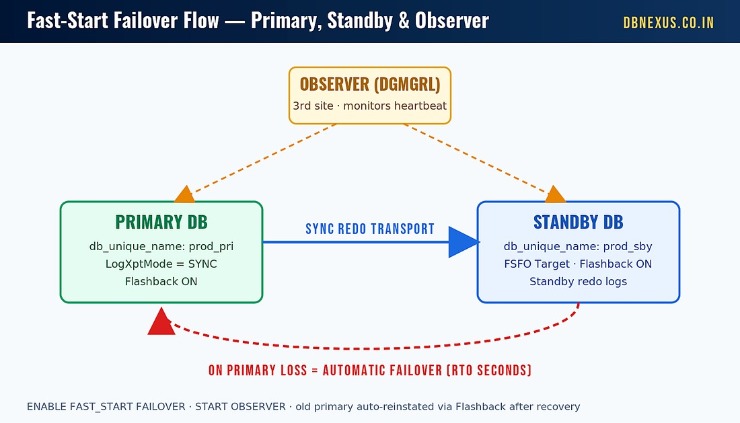 How FSFO works: the Observer monitors the primary and standby, and on primary loss promotes the standby automatically.
Switchover vs. Failover vs. Fast-Start Failover
A switchover is a graceful, planned role reversal — zero data loss, you choose the timing, and you can switch back. A failover is what happens when the primary is gone for good and the standby must take over now. Left to a human, failover is bounded by how fast someone gets paged, logs in, confirms the primary is truly dead, and types the command. That gap is your real Recovery Time Objective, and it is usually measured in minutes you cannot afford.
Where the Observer fits
Fast-Start Failover removes the human from the critical path. The Data Guard Broker runs a lightweight Observer — an OCI client built into DGMGRL — that continuously watches both databases. When the Observer and the standby both lose contact with the primary beyond the configured threshold, the Observer initiates the failover, promotes the standby, and (with Flashback Database enabled) automatically reinstates the old primary as a new standby once it returns. Oracle documents the full broker role-transition model in the Data Guard Broker guide.
Prerequisites: Get These Right or FSFO Will Not Arm
FSFO is unforgiving about prerequisites — miss one and ENABLE FAST_START FAILOVER simply refuses. Before you touch the broker, confirm: Data Guard Broker is already configured and healthy; Flashback Database is ON on both databases (this is what lets the old primary auto-reinstate); standby redo logs exist for real-time apply; a static db_unique_name_DGMGRL service is registered with the listener so the broker can bounce instances; and — critically — the Observer runs on a third host, not on the primary or standby.
-- On BOTH primary and standby: enable Flashback Database
-- (required so the failed primary can be reinstated automatically)
ALTER DATABASE FLASHBACK ON;

-- Confirm standby redo logs exist (needed for SYNC + real-time apply)
SELECT group#, type, member FROM v$logfile WHERE type = 'STANDBY';

-- listener.ora: static DGMGRL service lets the Broker restart instances
SID_LIST_LISTENER =
  (SID_LIST =
    (SID_DESC =
      (GLOBAL_DBNAME = prod_pri_DGMGRL)
      (ORACLE_HOME = /u01/app/oracle/product/19.0.0/dbhome_1)
      (SID_NAME = PROD)))
Step-by-Step: Configure FSFO in DGMGRL
Set protection mode and the failover target
Zero-data-loss FSFO needs synchronous redo transport and MAXAVAILABILITY protection mode. Then you tell the broker which standby is the failover target — and set the reverse target too, so the configuration stays valid after a role swap.
$ dgmgrl sys/password@prod_pri

-- Synchronous redo on both databases
DGMGRL> EDIT DATABASE 'prod_pri' SET PROPERTY LogXptMode='SYNC';
DGMGRL> EDIT DATABASE 'prod_sby' SET PROPERTY LogXptMode='SYNC';

-- Zero-data-loss protection mode
DGMGRL> EDIT CONFIGURATION SET PROTECTION MODE AS MAXAVAILABILITY;

-- Designate the failover target in both directions
DGMGRL> EDIT DATABASE 'prod_pri' SET PROPERTY FastStartFailoverTarget='prod_sby';
DGMGRL> EDIT DATABASE 'prod_sby' SET PROPERTY FastStartFailoverTarget='prod_pri';

-- Seconds the Observer waits after losing the primary before failing over
DGMGRL> EDIT CONFIGURATION SET PROPERTY FastStartFailoverThreshold='30';

-- Arm it
DGMGRL> ENABLE FAST_START FAILOVER;
Tip: keep the threshold realistic. Too low and a transient network blip triggers an unnecessary failover; too high and you erode the RTO you built FSFO to protect. We tune this number live with students on a real two-node cluster in the DBNexus Data Guard module — seeing the Observer actually decide is what makes the threshold click.
Start the Observer on a Third Site
Placement matters. If the Observer sits on the standby host and you lose the primary site, the surviving side cannot reliably distinguish a dead primary from a network partition. Putting the Observer on an independent third site is the configuration Oracle’s MAA team recommends — see Oracle’s Fast-Start Failover article for the failure-scenario walkthrough. Start it in the background so it survives your shell session:
-- Run on a THIRD host (not primary, not standby)
$ dgmgrl sys/password@prod_pri

DGMGRL> START OBSERVER prod_observer IN BACKGROUND
  FILE IS '/u01/app/oracle/fsfo/fsfo.dat'
  LOGFILE IS '/u01/app/oracle/fsfo/observer.log';

-- Verify everything is armed and ready
DGMGRL> SHOW FAST_START FAILOVER;
DGMGRL> SHOW CONFIGURATION;
In SHOW FAST_START FAILOVER you want to see Mode reading as the protection level you set, the threshold you chose, and Observer status showing as running and connected to both databases.
Rehearse Safely with Observe-Only Mode
Never let the first real FSFO event be a surprise. Oracle 19c lets you arm the Observer in Observe-Only mode: it evaluates every health condition and logs exactly what it would do, without actually promoting the standby. Run a failure drill, read the observer log, confirm the decision matches your expectation, then switch to live mode.
-- Safe rehearsal: the Observer watches and logs but will NOT fail over
DGMGRL> ENABLE FAST_START FAILOVER OBSERVE ONLY;

-- Simulate primary loss, then read /u01/app/oracle/fsfo/observer.log
-- to see the decision the Observer would have made.

-- When you trust it, return to live, zero-data-loss FSFO
DGMGRL> DISABLE FAST_START FAILOVER OBSERVE ONLY;
DGMGRL> ENABLE FAST_START FAILOVER;
Want to watch FSFO arm and fail over on a live cluster? The full Data Guard 19c playlist on our YouTube channel walks through broker setup, switchover, failover and reinstate on a real two-node lab.
Your FSFO Checklist for This Week
Turn on Flashback Database on both primary and standby, and confirm standby redo logs exist.
Register the static db_unique_name_DGMGRL service in listener.ora on every node.
Set MAXAVAILABILITY + SYNC and define FastStartFailoverTarget in both directions.
Stand up an Observer on a third host and start it in the background with a logfile.
Rehearse in Observe-Only mode before you trust it in production — then enable live FSFO.
Frequently Asked Questions
Does Fast-Start Failover cause data loss?
Not in MAXAVAILABILITY mode with SYNC redo transport — that combination gives zero data loss. In MAXPERFORMANCE with async transport you can still use FSFO, but you must accept a configured FastStartFailoverLagLimit, meaning you may lose up to that many seconds of redo.
Where should the Observer run?
On an independent third host or site — never on the primary or standby database server. That separation is what lets the Observer and standby agree the primary is genuinely gone rather than just unreachable from one location.
What happens to the old primary after a failover?
With Flashback Database enabled, the broker automatically reinstates the failed primary as a new standby once it comes back online. Without Flashback, you must manually recreate or flashback the database before it can rejoin the configuration.
Is FSFO different in Oracle 23ai and 26ai?
The core DGMGRL workflow is the same, so these commands transfer directly. Newer releases add conveniences around broker and observer management, but if you can configure FSFO on 19c you can configure it on 23ai and 26ai with minimal changes.
Ready to Ship Data Guard Failover in Production? Train with DBNexus.
DBNexus Training & Consulting (formerly Oracle DBA Online Training) runs live, instructor-led Oracle DBA programs covering Data Guard, RAC, RMAN, GoldenGate and upgrades. Real labs. Real scenarios. Recorded sessions. Lifetime access.
Hands-on labs on a real two-node Data Guard + RAC environment.
Production scenarios — failover drills, gap resolution, observer placement.
10,000+ DBAs trained globally across 19c, 23ai and 26ai.
Interview prep + CV review — FSFO is a favourite interview question.
Flexible weekday and weekend batches.
Subscribe to our YouTube channel for free Oracle DBA labs.
👉 Enroll for Oracle DBA Training → · Visit DBNexus.co.in
Seats fill fast around release season — lock in your Data Guard lab access before the next 26ai batch closes.
Become a production-ready Oracle DBA
Live weekend batches, recorded courses and on-job support — Oracle 19c, RAC, Data Guard, GoldenGate and Oracle AI Database 26ai.