Oracle GoldenGate 23ai Microservices Setup on Linux — Step-by-Step Production Lab (May 2026)
By DBNexus Editorial Team · Oracle DBA
Published June 1, 2026 · 7 min read
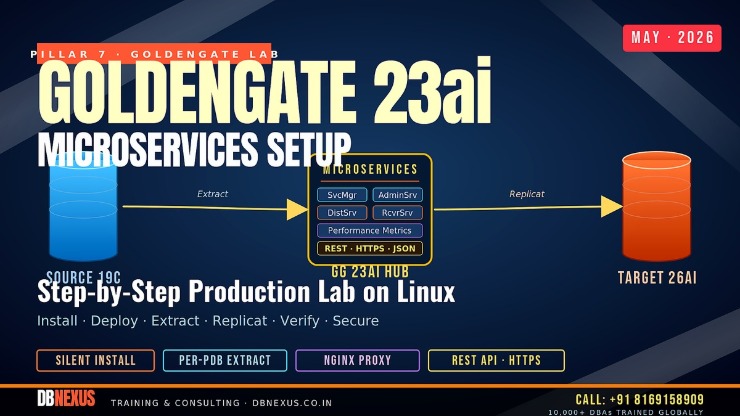 Hero - GoldenGate 23ai Microservices end-to-end production lab.
Classic Architecture is dead. Oracle GoldenGate 23ai removed it entirely, and 26ai will not even pretend it exists. If you still run ggsci with a single Manager process, you are one upgrade away from a Sunday-night rebuild. The good news: the Microservices Architecture (MSA) is far cleaner once you wire it up — five services, a REST API, an HTML5 console, and a deployment model that actually plays well with NGINX, OEM 24ai, and your Data Guard standby. This post is the hands-on lab my 19c-to-26ai PDB upgrade students ask for after their first switchover: source 19c PDB on one host, target 26ai PDB on another, GoldenGate 23ai in the middle, real Extract and Replicat, real trail, real verification.
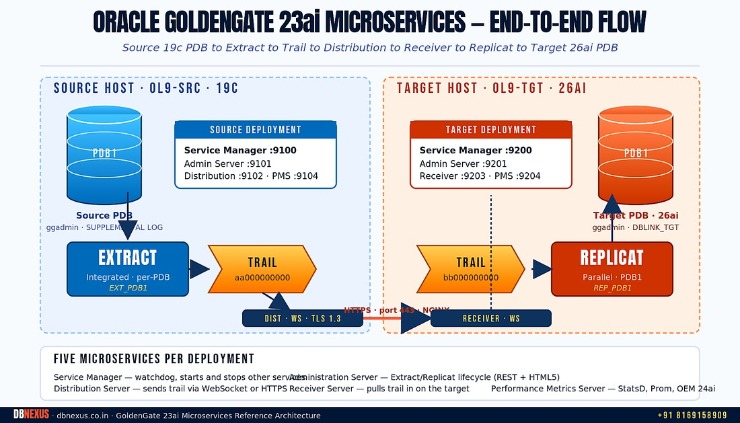 Reference architecture - five microservices per deployment, HTTPS trail transfer between source and target.
What changed between Classic and Microservices in 23ai
Classic Architecture leaned on one Manager process, a ggsci CLI, and a PUMP that copied trail files over TCP. Microservices Architecture splits that single Manager into five purpose-built services and replaces the PUMP with a real Distribution Server that streams trail over WebSocket on HTTPS. You configure everything through REST endpoints and an HTML5 console — which means automation (Ansible, Terraform, OEM 24ai jobs) finally works without screen-scraping ggsci output.
The five services you will actually use
Service Manager — the parent watchdog. Starts and stops every other service in a deployment.
Administration Server — Extract and Replicat lifecycle, parameter editing, checkpoints. Replaces ggsci + Manager.
Distribution Server — sends trail to one or many targets over WebSocket on HTTPS. PUMP replacement.
Receiver Server — runs only on the target. Pulls trail in. Decrypts, verifies, hands off to local trail.
Performance Metrics Server — streams StatsD-compatible metrics. OEM 24ai's GoldenGate plug-in plugs in here.
At DBNexus Training & Consulting (formerly Oracle DBA Online Training), every cohort builds this exact two-host lab — the goal is to land switchovers, target swaps, and failovers without ever opening a single classic-style parameter file.
Pre-flight checklist — source 19c and target 26ai
Build two Oracle Linux 9 hosts (ol9-src and ol9-tgt), each with the database running and listener up. The source runs Oracle Database 19c (19.26 RU or newer); the target runs Oracle AI Database 26ai (23.26.1). On the source, enable supplemental logging and force-logging at PDB level — without these, Extract will only capture row headers and you will spend three hours wondering why Replicat is silent.
Repeat the same ggadmin creation on the target PDB, then open firewall ports 9100–9104 on the source, 9200–9204 on the target, and 443 for the NGINX reverse proxy you will put in front of the consoles.
Silent install GoldenGate 23ai — the response-file approach
Skip the GUI. Production installs go through oraInst.loc + a response file — same model as the database installer. Oracle ships the response file inside the unzipped staging directory under response/oggcore.rsp. Edit four values and run runInstaller in silent mode. The Oracle blog covers 23ai silent install per technology if you need MySQL, PostgreSQL, or SQL Server variants.
Create the deployment with oggca
The Oracle GoldenGate Configuration Assistant (oggca.sh) is what turns the binaries into a running deployment. It scaffolds the Service Manager, the deployment directory, the per-deployment ServiceWallet, and the five service config files. Run it silently with a second response file — and pick the SCA (Secure Communication Architecture) option so you get TLS 1.3 from the first start.
$ cd $GG_HOME/bin
$ ./oggca.sh -silent -responseFile /tmp/oggca_source.rsp

# Verify the Service Manager came up:
$ systemctl status OracleGoldenGate
$ curl -k https://ol9-src:9100/services/v2/deployments

# Returns JSON with one entry: deploymentName=Source, status=running
How do you configure a per-PDB Extract in GoldenGate 23ai?
Log into https://ol9-src:9101 (Administration Server), authenticate as the GG admin user you created in the response file, and add the source credential alias pointing to the PDB. From there, the Extract creation is three REST calls or three clicks — but the parameter file is the part you must own.
-- adminclient (replaces ggsci):
ALTER CREDENTIALSTORE ADD USER ggadmin@pdb1 PASSWORD GG_StRoNg_2026 ALIAS src_pdb1
DBLOGIN USERIDALIAS src_pdb1
ADD SCHEMATRANDATA hr

-- Extract parameter file: EXT_PDB1.prm
EXTRACT EXT_PDB1
USERIDALIAS src_pdb1 DOMAIN OracleGoldenGate
EXTTRAIL aa
SOURCECATALOG pdb1
TABLE hr.*;

-- Register and start:
REGISTER EXTRACT EXT_PDB1 DATABASE CONTAINER (pdb1)
ADD EXTRACT EXT_PDB1 INTEGRATED TRANLOG, BEGIN NOW
ADD EXTTRAIL aa, EXTRACT EXT_PDB1, MEGABYTES 500
START EXTRACT EXT_PDB1
Why per-PDB? Starting with 23ai, root-level Extract is unsupported. You assign privileges and run capture at PDB level, period. This is a real change from 19c — if you script Extract creation, replace any c##ggadmin reference with a PDB-local user.
Distribution path — trail over HTTPS through NGINX
Distribution Server pushes the trail to Receiver Server on the target. Out of the box that means wss:// on port 9102 / 9203. In production you put NGINX (≥ 1.24, per Oracle's MAA reference architecture) in front so everything terminates on 443 and uses your existing wildcard cert.
# /etc/nginx/conf.d/ogg.conf  (on ol9-src AND ol9-tgt)
server {
    listen       443 ssl http2;
    server_name  ogg-src.dbnexus.lab;
    ssl_certificate     /etc/pki/tls/certs/ogg.crt;
    ssl_certificate_key /etc/pki/tls/private/ogg.key;
    ssl_protocols TLSv1.3;

    location /Source/distsrvr/ {
        proxy_pass         https://127.0.0.1:9102/;
        proxy_http_version 1.1;
        proxy_set_header   Upgrade     $http_upgrade;
        proxy_set_header   Connection  "upgrade";
        proxy_read_timeout 1800s;
    }
}
From the source Administration console, create a Distribution Path with source URI trail://aa and target URI wss://ogg-tgt.dbnexus.lab:443/Target/services/v2/receiverservice/v2/recvsrvr. The first connection negotiates TLS, the path goes RUNNING, and trail starts arriving in the target's var/lib/data/bb directory within seconds.
Watch the full walkthrough on the Oracle DBA Online Training YouTube channel — Session 64 of the GoldenGate playlist covers Extract, trail, and Replicat configuration on a live RAC + standby lab.
Apply changes with a parallel Replicat on the 26ai target
On the target, log into the Administration Server at https://ol9-tgt:9201 and add the target credential alias. For 26ai, the recommended apply mode is parallel non-integrated Replicat — it scales linearly with your MAP_PARALLELISM setting and avoids the apply-side serialization that bit a lot of 19c shops.
-- Replicat parameter file: REP_PDB1.prm
REPLICAT REP_PDB1
USERIDALIAS tgt_pdb1 DOMAIN OracleGoldenGate
MAP_PARALLELISM 4
MIN_APPLY_PARALLELISM 2
MAX_APPLY_PARALLELISM 8
SPLIT_TRANS_RECS 5000
ASSUMETARGETDEFS
DISCARDFILE ./dirrpt/rep_pdb1.dsc, APPEND, MEGABYTES 200
MAP pdb1.hr.*, TARGET pdb1.hr.*;

-- Register and start:
ADD REPLICAT REP_PDB1 PARALLEL, EXTTRAIL bb
START REPLICAT REP_PDB1
INFO REPLICAT REP_PDB1, DETAIL
Verify end-to-end — the three numbers that matter
Don't trust the console widgets alone. Run these three checks every time you stand up a new deployment, and add them to your monitoring runbook before you call the lab built.
Lag at chkpt vs. lag at exit — INFO ALL should show both under 10 seconds on a quiet system. Anything over 60 seconds means your trail or apply is starved.
Trail position parity — compare INFO EXTRACT EXT_PDB1, SHOWCH on the source to INFO REPLICAT REP_PDB1, SHOWCH on the target. The Output Checkpoint sequence numbers should track within one or two files.
Statistics roll-up — STATS REPLICAT REP_PDB1, TOTAL should show non-zero inserts/updates/deletes for every mapped table you actively touched on the source.
Your this-week action list
Build the two-host lab in OCI Free Tier or VirtualBox — Oracle Linux 9, 19c on src, 26ai on tgt.
Silent-install GoldenGate 23ai using the response file template above, then oggca two deployments.
Wire NGINX in front of both consoles so port 443 is the only thing your firewall ever sees.
Add SCHEMATRANDATA, create EXT_PDB1 + REP_PDB1, verify the three numbers above.
Plug the deployments into OEM 24ai's GoldenGate plug-in for production alerting.
FAQ — Oracle GoldenGate 23ai Microservices
Is Classic Architecture still supported in GoldenGate 23ai?
No. Classic Architecture was deprecated in 21.1 and removed entirely in 23ai. 26ai will not ship a Classic binary at all. If you are still on Classic in 19c, plan the migration before your next major upgrade — the cutover is essentially a fresh MSA install plus a parameter-file rewrite.
Do I need a separate ggadmin user per PDB in 23ai?
Yes. Root-level Extract was removed in 23ai. The c##ggadmin common user pattern that worked in 19c will not register Extract in 23ai. Create ggadmin inside each source and target PDB and grant via dbms_goldengate_auth.grant_admin_privilege with the container=> parameter.
Can I run GoldenGate 23ai against an Oracle Database 26ai target?
Yes. GoldenGate 23ai is certified for 19c, 23ai, and 26ai sources and targets. The mixed-version use case is the most common upgrade path — 19c source feeding a 26ai target during a zero-downtime migration. See our 19c-to-26ai PDB upgrade lab for the upgrade-side workflow.
What ports do I open for a production Microservices deployment?
If you front everything with NGINX (recommended), only port 443 needs to leave the host. Internally, Service Manager defaults to 9100/9200, Admin to 9101/9201, Distribution to 9102, Receiver to 9203, and Performance Metrics to 9104/9204. Set them explicitly in the oggca response file so they survive future rebuilds.
How is GoldenGate 26ai different from 23ai for an existing MSA shop?
26ai is incremental on the architecture side — the five services and the deployment model are unchanged. The differences are AI-pipeline integrations (vector replication, automatic conflict resolution metadata for True Cache), expanded heterogeneous targets, and a new administration UI. If your MSA-on-23ai lab works, the 26ai upgrade is largely a binary swap.
Ready to ship GoldenGate 23ai Microservices in production? Train with DBNexus.
DBNexus Training & Consulting runs live, instructor-led Oracle DBA programs covering GoldenGate 23ai Microservices, RAC, Data Guard, RMAN, OEM 24ai, and the 19c-to-26ai upgrade path. Real labs. Real production scenarios. Recorded sessions. Lifetime access.
Hands-on labs — the same two-host GoldenGate setup walked through in this post, plus RAC + DG add-ons.
Production scenarios — real switchovers, real lag-spike investigations, real DDL replication failures.
1000+ DBAs trained globally across India, US, UK, Singapore, and the Middle East.
Interview prep + CV review built into every cohort — including the GoldenGate scenarios your client will ask.
Flexible weekend and weekday batches in IST, GST, and EST.
Subscribe to the Oracle DBA Online Training YouTube channel for 200+ free tutorials.
📞 CALL NOW: +91 8169158909 — talk to the DBNexus team directly about the next batch, fees, and a free demo session. (India, IST 9 AM – 10 PM.)
👉 Enroll for Oracle DBA Training → · Visit DBNexus.co.in
Mention this post when you call — free demo session on the GoldenGate 23ai Microservices two-host lab, including the NGINX reverse-proxy walkthrough.
Become a production-ready Oracle DBA
Live weekend batches, recorded courses and on-job support — Oracle 19c, RAC, Data Guard, GoldenGate and Oracle AI Database 26ai.