Install Oracle Enterprise Manager 24ai on Oracle Linux 9 — Step-by-Step DBA Lab in 60 Minutes (2026)
By DBNexus Editorial Team · Oracle DBA
Published June 3, 2026 · 7 min read
 Install OEM 24ai on Oracle Linux 9 — Cloud Control 24.1 RU 08, end-to-end DBA lab
Oracle pushed Enterprise Manager 24ai Release 1 Update 08 (patches 38735203 / 38735209) in April 2026, and it is now the cleanest baseline for a fresh OMS install. If you are standing up Cloud Control on Oracle Linux 9 in a homelab, a customer site, or a new DBA training rack, this is the working recipe — host prerequisites, a 19c EMCDB container with an EMREP pluggable repository, a silent install driven by a response file, and the RU 08 patch on top. Useful sister pieces: the Oracle AI Database 26ai on-premises rundown (because the 24ai console now monitors 26ai natively) and the 19c non-CDB to 26ai PDB AutoUpgrade lab, since the repository stack and many target-promote steps look identical.
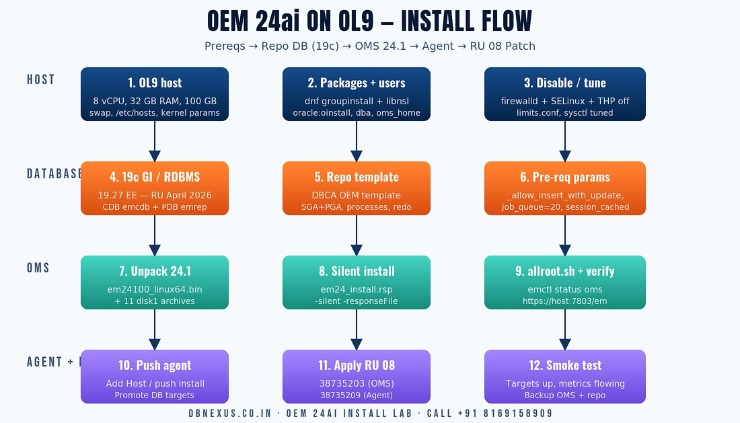 OEM 24ai install flow: OL9 host prep → 19c repo (EMCDB + EMREP) → silent OMS install → agent push → RU 08 patch.
What is actually new in OEM 24ai 24.1 RU 08 (and why you want this baseline)
OEM 24ai is the Cloud Control branch that replaced 13.5. The 24.1 base release shipped in late 2024, and Oracle has been stacking quarterly Release Updates on top. RU 08 (April 2026) is the current one as of this lab and fixes a stack of OMS, agent, and repository issues — plus rolls in Zero Downtime Patching improvements, expanded AI Vector Search monitoring for 26ai targets, and tighter integration with the OCI bridge for hybrid fleets.
Three things matter for a working DBA:
Repository must be 19c Enterprise Edition — 23ai and 26ai are not yet certified as OMS repository databases. Use a 19c CDB.
OL9 is fully certified for OMS, agent, and repo. The package list is shorter than OL7 / OL8 and libnsl is still the one most fresh installs forget.
Plan the OMS host at 32 GB RAM minimum — the small footprint OMS is for demos, not real targets. 64 GB and 8 vCPU is the sweet spot for a single-OMS lab.
OL9 host prerequisites — the 12 things to check before runInstaller
Most failed OEM 24ai installs are not the installer's fault. They are missing kernel parameters, the firewall, or libnsl. Run this once on the fresh OL9 host as root:
# OL9 prereqs for OEM 24ai 24.1 — run as root
# 1. Packages
dnf groupinstall -y "Development Tools"
dnf install -y oracle-database-preinstall-19c make binutils gcc \
  libaio libstdc++ sysstat glibc-devel glibc-common libXtst libnsl \
  libnsl2 motif compat-openssl11 unzip

# 2. Users / dirs
groupadd -g 54321 oinstall
groupadd -g 54322 dba
useradd  -u 54321 -g oinstall -G dba oracle
mkdir -p /u01/app/oracle/oms /u01/app/oracle/agent /u01/swlib /u01/gc_inst
chown -R oracle:oinstall /u01 && chmod -R 775 /u01

# 3. Kernel + limits (append to /etc/sysctl.d/97-oem.conf)
cat >> /etc/sysctl.d/97-oem.conf <<'EOF'
fs.aio-max-nr = 1048576
fs.file-max = 6815744
kernel.shmall = 4294967296
kernel.shmmax = 17179869184
kernel.shmmni = 4096
kernel.sem = 250 32000 100 128
net.core.rmem_default = 262144
net.core.wmem_default = 262144
net.core.rmem_max = 4194304
net.core.wmem_max = 1048576
net.ipv4.ip_local_port_range = 9000 65535
EOF
sysctl --system

# 4. Firewall + SELinux (lab posture — review for prod)
systemctl disable --now firewalld
setenforce 0 && sed -i 's/^SELINUX=enforcing/SELINUX=permissive/' /etc/selinux/config

# 5. THP off (OEM repo hates it)
echo never > /sys/kernel/mm/transparent_hugepage/enabled
echo never > /sys/kernel/mm/transparent_hugepage/defrag

# 6. /etc/hosts — OMS needs FQDN resolvable
echo "192.168.56.10  oms24ai.lab.local  oms24ai" >> /etc/hosts
hostnamectl set-hostname oms24ai.lab.local
Step 1 — Build the 19c repository database (EMCDB + EMREP)
Install Oracle Database 19c Enterprise Edition (software-only), apply the April 2026 RU so you are on 19.27, then create a CDB called emcdb with a PDB called emrep. Use the OEM-shipped DBCA template — it pre-sets the init params OMS wants. Tim Hall's silent OEM 24.1 walkthrough is a good external sanity check on this stage.
# As oracle, after 19c software-only install and the April 2026 RU
$ORACLE_HOME/bin/dbca -silent -createDatabase \
  -templateName General_Purpose.dbc \
  -gdbName emcdb -sid emcdb -responseFile NO_VALUE \
  -createAsContainerDatabase true \
  -numberOfPDBs 1 -pdbName emrep \
  -sysPassword Welcome_1 -systemPassword Welcome_1 -pdbAdminPassword Welcome_1 \
  -datafileDestination /u01/oradata -recoveryAreaDestination /u01/fra \
  -storageType FS -characterSet AL32UTF8 \
  -memoryMgmtType auto_sga -totalMemory 16384 \
  -emConfiguration NONE -enableArchive true -redoLogFileSize 512 \
  -sampleSchema false -dvConfiguration false

# Pre-create the params OMS validates against
sqlplus / as sysdba <<'EOS'
alter system set sga_target=12G scope=spfile;
alter system set pga_aggregate_target=4G scope=spfile;
alter system set processes=600 scope=spfile;
alter system set session_cached_cursors=200 scope=spfile;
alter system set open_cursors=400 scope=spfile;
alter system set db_block_checking='MEDIUM' scope=spfile;
alter system set db_block_checksum='FULL' scope=spfile;
alter system set "_allow_insert_with_update_check"=true scope=spfile;
shutdown immediate;
startup;
EOS
If you are wiring up OEM 24ai for the first time and the response-file syntax keeps biting you, the live DBNexus Oracle DBA program walks every batch through this exact lab on a shared sandbox — it is the fastest way to catch the OL9-specific gotchas before they cost you a production weekend.
Step 2 — Silent install OMS 24.1 with a response file
Download em24100_linux64.bin plus all the disk1 archives from edelivery.oracle.com into /u01/swlib. A response file is shorter, less error-prone, and reproducible across hosts. The full schema is in the Oracle Enterprise Manager Basic Installation Guide (24ai R1) — the snippet below covers the fields you almost always set.
# /u01/swlib/em24_install.rsp  — minimal working response file
RESPONSEFILE_VERSION=2.2.1.0.0
UNIX_GROUP_NAME=oinstall
INVENTORY_LOCATION=/u01/app/oraInventory
SECURITY_UPDATES_VIA_MYORACLESUPPORT=false
DECLINE_SECURITY_UPDATES=true
INSTALL_UPDATES_SELECTION=skip

ORACLE_MIDDLEWARE_HOME_LOCATION=/u01/app/oracle/oms/middleware
ORACLE_HOSTNAME=oms24ai.lab.local
AGENT_BASE_DIR=/u01/app/oracle/agent
GC_INST_LOC=/u01/gc_inst

ADMIN_PASSWORD=Welcome_1
DATABASE_HOSTNAME=oms24ai.lab.local
LISTENER_PORT=1521
SERVICENAME_OR_SID=emrep
SYS_PASSWORD=Welcome_1
SYSMAN_PASSWORD=Welcome_1
DEPLOYMENT_SIZE=SMALL          # SMALL | MEDIUM | LARGE
PLUGIN_SELECTION={"oracle.sysman.db","oracle.sysman.emas","oracle.sysman.xa"}
b_upgrade=false

# Launch it
cd /u01/swlib
chmod +x em24100_linux64.bin
./em24100_linux64.bin -silent -responseFile /u01/swlib/em24_install.rsp \
   -staticPorts /u01/swlib/staticports.ini -showProgress
# When prompted, as root:
/u01/app/oracle/oms/middleware/allroot.sh
Expect 25–40 minutes wall-clock on the SMALL deployment size. When it finishes, the installer prints the OMS console URL. Verify before moving on:
# As oracle
. /u01/app/oracle/oms/middleware/bin/emctl_env.sh  # or set OMS_HOME manually
emctl status oms -details   # OMS up
emctl status agent          # local agent up
curl -k https://oms24ai.lab.local:7803/em/console/logon/logon | head -5
Watch the full OEM 24ai installation walkthrough on the DBNexus / Oracle DBA Online Training YouTube channel — same response-file approach, recorded end-to-end with screen capture.
Step 3 — Apply RU 08 and push agents to your existing DB targets
Never run an OMS for more than a week without the latest RU — too many fixes are quietly bundled in. RU 08 ships as a holistic patch you apply with OMSPatcher:
# Stage RU 08 (Patch 38735203 for OMS, 38735209 for agents)
cd /u01/swlib/RU08
unzip -q p38735203_240000_Linux-x86-64.zip

# OMSPatcher needs the OMSPatcher binaries refreshed on every RU
export ORACLE_HOME=/u01/app/oracle/oms/middleware
$ORACLE_HOME/OMSPatcher/omspatcher apply -bitonly      # readiness check
$ORACLE_HOME/OMSPatcher/omspatcher apply -analyze       # dry run
$ORACLE_HOME/OMSPatcher/omspatcher apply                # real run

# Push agent RU from EM console
emcli login -username=sysman -password=Welcome_1
emcli submit_procedure -name="Agent Patch" -input_file=data:/u01/swlib/agent_patch.json
To monitor existing 19c, 23ai, or 26ai databases, push an agent to each target host and promote the listener and database. The Add Host wizard handles ssh-key push install — you do not need to manually copy agent24100_linux64.zip anywhere. Pair OEM's blocking-session metrics with the SQL playbook in Kill Blocking Sessions in Oracle 19c & 23ai/26ai — the 60-Second DBA Playbook — that is how you turn an alert into a 60-second fix instead of a 30-minute panic.
Four failures that bite every first-time install
PRVF-7532 — libnsl not found
OL9 split libnsl into libnsl and libnsl2. The installer wants both. Run dnf install -y libnsl libnsl2 and re-run prereqs.
CFGFWK-64246 — repository CONNECT_DATA SID mismatch
You created emrep as a PDB but pointed the response file at the CDB. Use the PDB service name in SERVICENAME_OR_SID — never the CDB SID.
WLS port 7101 already in use
Something else owns the Admin Server port — usually a stray test process. Set a static ports file (the staticports.ini flag in the install command) and lock 7101, 7301, 7803, 4903, 4889.
Repo db getting 100% CPU during install
Pre-set session_cached_cursors=200, processes=600, and SGA ≥ 12 GB. The OEM repo schema creation runs thousands of PL/SQL calls; a small SGA + low cursor cache will pin the CPU.
What to do this week
Spin up a fresh OL9 VM (8 vCPU, 32 GB RAM, 200 GB) and run the prereq block end-to-end before downloading any binaries.
Stage the 24.1 base release plus RU 08 in /u01/swlib so you can patch immediately after the base install completes.
Decide deployment size honestly — SMALL for ≤250 targets, MEDIUM up to 1000, LARGE above that. Wrong sizing here is the #1 reason OMS feels slow six months later.
After base install, run a backup of the OMS configuration (emctl exportconfig oms) and the repo (RMAN level-0). RU patching can fail; rollback needs both backups.
Subscribe to the DBNexus / Oracle DBA Online Training YouTube channel for the full RU 08 patching and Zero Downtime Patching walkthroughs.
FAQ
Can I use a 23ai or 26ai database as the OEM 24ai repository?
Not as of RU 08. Oracle still certifies only 19c Enterprise Edition (19.21 or higher) as the repository database. You can still monitor 23ai and 26ai targets — that works fine — but the repo itself stays on 19c.
How long does the RU 08 patch take on a small lab OMS?
Roughly 25–35 minutes including the analyze and apply phases on a SMALL deployment. Real production OMSes with many agents push closer to 90 minutes — and that is exactly the use case Zero Downtime Patching is built for.
What is the lightest viable OMS sizing for a home lab?
8 vCPU, 32 GB RAM, 200 GB disk on the OMS host. The 19c repository database can co-exist on the same VM if you size SGA + OMS Java heap carefully (12 GB + 12 GB), but a separate 19c host is cleaner and matches what you will see in real customer sites.
Do I need a separate host for the agent?
Every monitored target host needs its own agent. The OMS host already has a local agent installed automatically — that is the one monitoring the repository database and the OMS itself.
Ready to ship OEM 24ai in production? Train with DBNexus.
DBNexus Training & Consulting (formerly Oracle DBA Online Training) runs live, instructor-led Oracle DBA programs covering OEM 24ai, Oracle 19c, 23ai, 26ai, RAC, Data Guard, RMAN, GoldenGate and OCI. Real labs. Real production scenarios. Recorded sessions. Lifetime access.
Hands-on labs — every student installs their own OEM 24ai OMS, repo, and agent stack from scratch
Production scenarios — RU patching, ZDT patching, agent migration, repo recovery walked through end-to-end
10,000+ DBAs trained globally — alumni working at Fortune 500, banks, telcos and major cloud providers
Interview prep + CV review for OEM, RAC and Data Guard roles included in every cohort
Flexible batches — weekend, weekday-evening, and intensive corporate options
Subscribe to YouTube channel for 200+ free Oracle DBA tutorials covering OEM, RAC, Data Guard, RMAN, AutoUpgrade and 26ai
📞 CALL NOW: +91 8169158909 — talk to the DBNexus team directly about the next OEM 24ai batch, fees and a free demo. (India, IST 9 AM–10 PM.)
👉 Enroll for Oracle DBA Training → · Visit DBNexus.co.in
Mention this post when you call — we will throw in a free demo session on the OEM 24ai install lab so you can walk every step on a live VM before you enroll.
Become a production-ready Oracle DBA
Live weekend batches, recorded courses and on-job support — Oracle 19c, RAC, Data Guard, GoldenGate and Oracle AI Database 26ai.