Exadata Smart Scan Explained: How Cell Offload Cuts Database I/O by 90% on X11M (2026 Deep Dive)
By DBNexus Editorial Team · Oracle DBA
Published May 27, 2026 · 8 min read
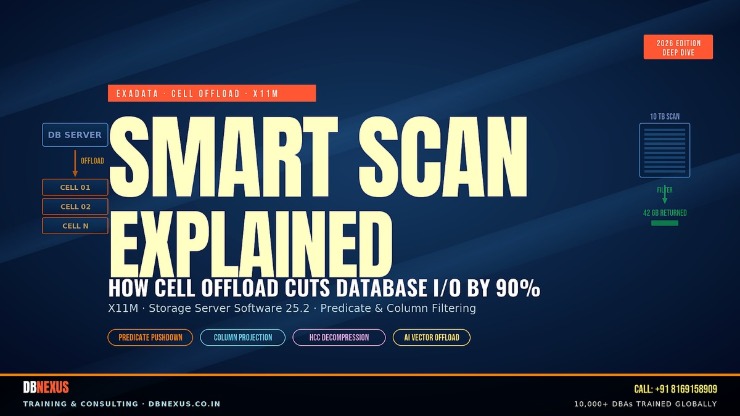 Smart Scan offloads predicate, projection and HCC decompression into the storage cells — X11M (2026)
On Oracle Exadata X11M, a single storage cell can scan flash at 100 GB/s and XRMEM at 500 GB/s — but only when Smart Scan is actually doing its job. The moment your query stops offloading, you are paying X11M prices for the same I/O bottlenecks you'd hit on a generic RAC cluster. This post breaks down exactly how cell offload works, the v$ views that prove it, and the patterns that quietly disable it — the same playbook our students use to ship 19c and 26ai workloads without losing offload eligibility.
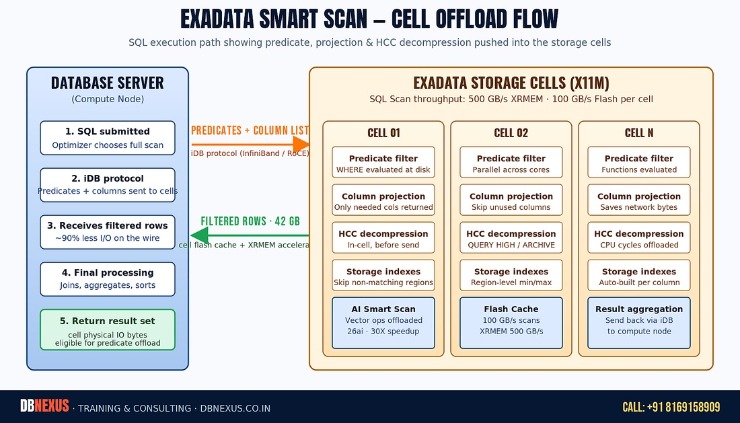 The 5-step Smart Scan path: SQL → iDB → cell predicate filter + column projection + HCC decompression → filtered rows → final result
What is Exadata Smart Scan, exactly?
Smart Scan is the storage-side query engine that runs inside every Exadata storage cell. When the database server decides a SQL statement is eligible (full table scan, fast full index scan, or scan over a partition), it ships the predicates and the list of needed columns down to the cells using the iDB protocol (Intelligent Database protocol, layered on InfiniBand or RoCE). Each cell then evaluates the WHERE clause, projects the columns, decompresses HCC blocks if needed, and sends only the matching rows back to the compute node.
On a generic shared-storage SAN, every block has to travel from the array to the database server before a single row can be filtered. On Exadata, the cells do the work in parallel — typically 12 to 30 cores per cell — and the database server receives a tiny fraction of the original scan. This is the foundation of every Exadata performance claim: less data on the wire, more CPUs doing the filtering, processing closer to the disk. For a deeper architectural read, see Oracle's official Exadata AI Smart Scan deep dive.
How do you confirm a query actually used Smart Scan?
Two things you need: the execution plan showing TABLE ACCESS STORAGE FULL with a storage() predicate, and the session statistic cell physical IO bytes eligible for predicate offload being non-zero. If the plan says TABLE ACCESS FULL (without STORAGE), the optimizer never even considered offload.
-- 1. Did the query use a Smart Scan path?
SET LINESIZE 200
SET PAGESIZE 200
EXPLAIN PLAN FOR
SELECT /*+ FULL(s) */ COUNT(*)
  FROM sales s
 WHERE channel_id = 3
   AND amount_sold > 1000;

SELECT * FROM TABLE(DBMS_XPLAN.DISPLAY(NULL,NULL,'BASIC +PREDICATE'));
-- Look for:  TABLE ACCESS STORAGE FULL
--            storage("AMOUNT_SOLD">1000 AND "CHANNEL_ID"=3)

-- 2. Did the cells actually offload predicates?
SELECT name, value
  FROM v$mystat m
  JOIN v$statname n ON m.statistic# = n.statistic#
 WHERE n.name IN (
   'cell physical IO bytes eligible for predicate offload',
   'cell physical IO interconnect bytes returned by smart scan',
   'cell physical IO bytes saved by storage index',
   'physical read total bytes'
 );

-- Smart-scan efficiency =
--   1 - (interconnect bytes returned / bytes eligible)
-- Healthy OLAP workloads sit at 0.85 - 0.99 (i.e. 85-99% saved).
What actually gets offloaded into the cells?
Three big things plus a few small ones. The big three are predicate filtering, column projection and HCC decompression — and they compound: a query that filters 90% of rows AND projects only 5 columns out of 200 AND lives on QUERY HIGH HCC will often see 99%+ of the eligible bytes never leave the storage tier. The cells also handle storage indexes (region-level min/max so whole 1 MB regions get skipped), most scalar SQL function evaluation, simple JOIN filters via Bloom filters, and — new in 26ai — AI Vector Search distance computation, which Oracle is now publishing at up to 30X speedup over compute-node-only execution.
Storage indexes are free, but they're not indexes
Storage indexes are an in-memory min/max map maintained per 1 MB region per column, built automatically on the first scan. They are not B-tree indexes. They consume no schema space, generate no redo, and you cannot ALTER them. They do, however, get rebuilt when the cell restarts, so the first scan after a planned outage will look slower than the second — that's normal, not a problem.
If you want to see Smart Scan, storage indexes and HCC behave the way the docs claim — on a real cell — that is exactly the kind of lab session DBNexus runs in the Exadata module. Real X8M cells, real cellcli, real wait events.
Patterns that silently disable Smart Scan
This is where most production tickets actually live. The optimizer is allowed to choose the offload path; it is not forced to. And several patterns make it ineligible without throwing a single error. The five we see most often, in roughly descending frequency:
Index access paths. If the optimizer chooses a B-tree index range scan, you get conventional buffered reads, not direct path reads — no offload. The fix is usually statistics or a hint, not killing the index.
Small tables under the direct path threshold. Smart Scan needs a direct path read. Tables below _small_table_threshold go through the buffer cache and never touch a cell engine.
Chained or migrated rows. Once a row is chained across blocks, the cell can't evaluate the predicate locally and the block falls back to the database server.
PL/SQL functions in the WHERE clause. Cells evaluate most SQL functions (UPPER, SUBSTR, TRUNC, etc.) but not user-defined PL/SQL. One WHERE my_pkg.classify(x) = 'A' disables offload for that predicate.
Encrypted columns without TDE tablespace encryption. Column-level encryption forces the database server to decrypt; tablespace-level TDE keeps offload working on X11M. Oracle's Smart Scan of Encrypted Data documentation has the full matrix.
The two-minute diagnostic script
Save this. Run it whenever an Exadata query feels slower than it should. It tells you in seconds whether the workload is offloading and where the bytes are going.
-- exadata_offload_check.sql  --  run as the app user or SYS
COL stat FORMAT a55
COL gb   FORMAT 999,999.99

WITH s AS (
  SELECT n.name AS stat, m.value AS bytes
    FROM v$mystat m
    JOIN v$statname n ON m.statistic# = n.statistic#
   WHERE n.name IN (
     'physical read total bytes',
     'cell physical IO bytes eligible for predicate offload',
     'cell physical IO interconnect bytes returned by smart scan',
     'cell physical IO bytes saved by storage index'
   )
)
SELECT stat, ROUND(bytes/1024/1024/1024, 2) AS gb FROM s
UNION ALL
SELECT '---- offload efficiency (%) ----',
       ROUND(100 * (1 - (
         (SELECT bytes FROM s WHERE stat = 'cell physical IO interconnect bytes returned by smart scan')
         /
         NULLIF((SELECT bytes FROM s WHERE stat = 'cell physical IO bytes eligible for predicate offload'),0)
       )), 2)
FROM dual;

-- Rule of thumb on X11M:
--   eligible bytes near 0           --> offload was never possible (check the plan)
--   eligible > 0, efficiency < 50%  --> bad predicate or HCC issue
--   efficiency 85-99%               --> healthy Smart Scan workload
What changed in Oracle AI Database 26ai for Smart Scan?
Two things matter for a working DBA upgrading from 19c to 26ai on Exadata. First, AI Vector Search distance computation is now an offloaded operation when paired with Storage Server Software 25.x and X10M/X11M — Oracle publishes up to a 30X speedup versus compute-only execution. If your team is rolling out the new 26ai AI Vector Search and JSON Duality features, make sure you are on 25.2 cells or later, otherwise the offload simply doesn't engage.
Second, the cell software now supports True Cache offload coordination and finer-grained Smart Scan over PDB-level Data Guard, so the same predicate-pushdown behavior survives a switchover — important if you've adopted PDB-level standbys. The detailed cell parameters and reproducible benchmarks are in Oracle's Offloading Data Search and Retrieval Processing chapter of the Storage Server User Guide.
Live Smart Scan demo on real Exadata hardware. Subscribe to the Oracle DBA Online Training channel for the full Exadata, 19c and 26ai playlist.
How would you explain Smart Scan in a senior DBA interview?
Interviewers do not want the marketing definition. They want to hear that you understand eligibility, the wait events, and the failure modes. Structure your answer in three beats. One: Smart Scan offloads predicate filtering, column projection and HCC decompression into the cells over the iDB protocol, but it requires a direct-path read against an Exadata-resident segment. Two: you confirm it with the STORAGE FULL plan line plus the offload statistics from v$mystat, and you measure efficiency as ‘1 minus interconnect bytes over eligible bytes'. Three: it can be silently disabled by an index path, a PL/SQL predicate, chained rows, or column-level encryption — and you've fixed each of these in production.
That is a senior answer. If you can finish with a number — ‘on our last engagement, we lifted offload efficiency from 41% to 92% by replacing a PL/SQL predicate with a SQL CASE expression' — you've already separated yourself from 90% of the candidates. The same scenario-based answers come up in our interview prep tracks alongside RAC node eviction and Data Guard troubleshooting.
Your Smart Scan checklist for this week
Run exadata_offload_check.sql on your top 5 Exadata workloads. Capture the baseline efficiency number — you will need it later.
Find one query with eligible bytes > 0 but efficiency < 50%. That is the cheapest performance win on the system.
Audit your top 20 SQL plans for TABLE ACCESS FULL without STORAGE — those are queries that should be offloading but aren't.
Check your cell software version: cellcli -e 'list cell detail' — anything below 25.2 should be on the patch calendar.
List columns encrypted at the column level (not tablespace TDE). Each one is a Smart Scan blocker.
FAQ — Exadata Smart Scan & cell offload
Does Smart Scan work on regular AWR/SYSAUX tables?
Only if they live on Exadata storage and the optimizer picks a direct-path scan. Tiny dictionary scans almost never offload — and they don't need to.
Can I force Smart Scan with a hint?
No direct hint exists, but /*+ FULL(t) PARALLEL(t, n) */ steers the optimizer toward a direct-path read, which is the prerequisite for offload. The STORAGE() predicate in the plan is the proof.
Why is my Smart Scan slow even at 99% efficiency?
Efficiency measures bytes saved, not latency. If the cells are CPU-saturated, every offloaded row still takes longer to process. Check cell CPU and concurrent session count before assuming the network is the bottleneck.
Does Smart Scan work on Exadata Cloud@Customer (ExaCC) and OCI Exadata DB Service?
Yes — the cells in ExaCC and Exadata Cloud Service run the same Storage Server software. The offload path is identical to on-premises Exadata; only the management plane changes.
How is Smart Scan different from in-memory column store?
In-Memory keeps a columnar copy in RAM on the database server. Smart Scan runs against persistent data on the cells. They are complementary: Oracle's optimizer can split a query so that hot partitions run from In-Memory and cold partitions offload to Smart Scan in the same plan.
Ready to ship Exadata Smart Scan in production? Train with DBNexus.
DBNexus Training & Consulting (formerly Oracle DBA Online Training) runs live, instructor-led Oracle DBA programs covering Exadata, RAC, Data Guard, RMAN, GoldenGate, OEM 24ai, 19c and 26ai — the exact stack you need to read the offload stats above and act on them in your environment. Real labs. Real production scenarios. Recorded sessions. Lifetime access.
Hands-on Exadata labs — real cellcli, real Smart Scan diagnostics, no slideware-only sessions
Production scenarios — offload regressions, HCC trade-offs, cell patching, ExaCC migration
10,000+ DBAs trained globally — from career switchers to senior consultants
Interview prep + CV review — Smart Scan, RAC eviction, Data Guard switchover, every senior question we've seen
Flexible batches — weekday evenings and weekend mornings (IST), recorded for night-shift folks abroad
Subscribe to the YouTube channel for 200+ Oracle DBA tutorials, free
📞 CALL NOW: +91 8169158909 — talk to the DBNexus team directly about the next batch, fees and a demo. (India, IST 9 AM – 10 PM.)
👉 Enroll for Oracle DBA Training → · Visit DBNexus.co.in
Mention this post when you call — free demo session on the Exadata Smart Scan and cell offload lab. Limited seats in the next weekend morning batch.
Bonus: ask for the ‘Smart Scan diagnostic SQL pack' PDF — the 12 queries every Exadata DBA should have in their back pocket. Free when you book a demo.
Become a production-ready Oracle DBA
Live weekend batches, recorded courses and on-job support — Oracle 19c, RAC, Data Guard, GoldenGate and Oracle AI Database 26ai.