Oracle Database on OCI in 2026: What a DBA Still Manages
By DBNexus Editorial Team · Oracle DBA
Published Oct 2026 · 6 min read
A few years ago "Oracle in the cloud" meant one thing: a VM on OCI that you installed and patched like any other server. In 2026 the picture is very different. Oracle Database@Azure has been running since December 2023, Oracle Database@Google Cloud went generally available in September 2024, and Oracle Database@AWS followed in July 2025 — reportedly reaching 20 AWS regions during 2026. The same Exadata and Autonomous Database services now sit inside all three hyperscalers' data centres.
For DBAs this changes the job more than the technology. Installing software matters less; knowing exactly what you still own on each service — and what Oracle now does for you — matters more. This guide maps that split, then walks through the day-2 commands you will actually run.
The three ways to run Oracle Database on OCI
- Base Database Service — VM DB systems, single instance or two-node RAC. You get root and the OS; Oracle provides the tooling for backups and patching.
- Exadata Database Service — VM clusters on Exadata hardware (dedicated infrastructure, Exascale or Cloud@Customer). RAC is built in; you manage the VM cluster OS and the database homes through Oracle's tooling.
- Autonomous Database — Oracle runs the OS, Grid Infrastructure, patching and backups. You manage data, users, access and how much compute you pay for.
Database@AWS, @Azure and @Google Cloud are not a fourth model: they are Exadata Database Service and Autonomous Database running on OCI hardware inside the other cloud. The responsibility split below applies to them too.
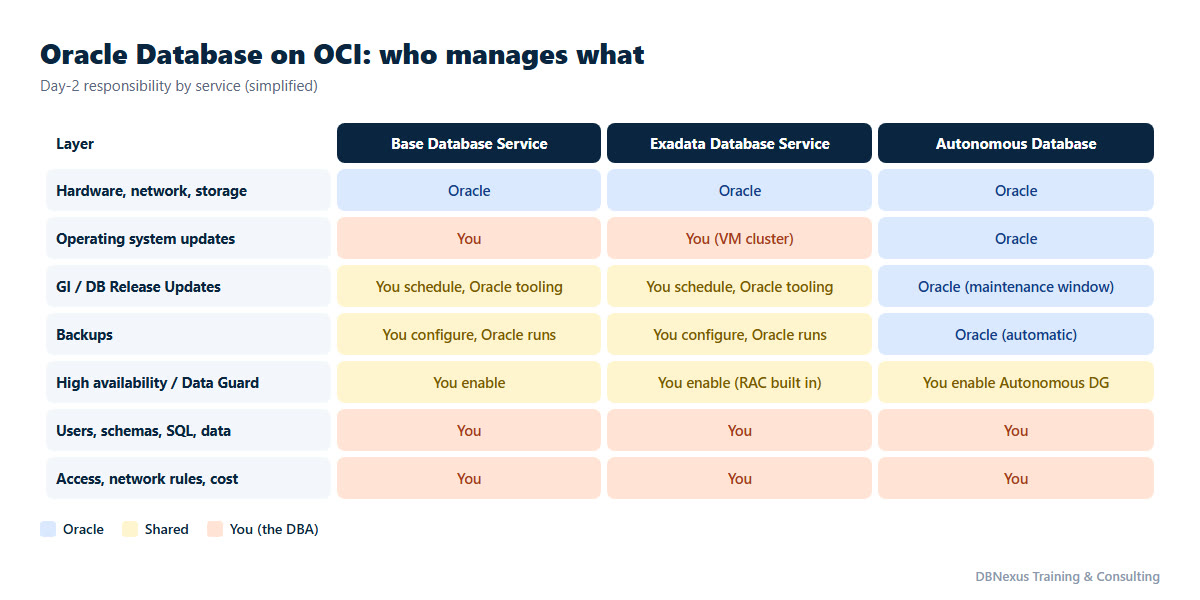
The pattern to remember: the more managed the service, the more your job moves up the stack — from OS and patches to data, security, availability and cost. Nothing on that chart removes the DBA; it changes which rows you are accountable for.
Day-2 operations on Base Database Service
This is the service closest to on-premises, and the one most teams start with. Three habits keep it healthy.
1. Know your estate from the CLI, not just the Console
OCI CLI is preinstalled in Cloud Shell. Two commands give you an inventory you can script and diff:
# DB systems in a compartment
oci db system list --compartment-id $C_ID --output table \
  --query 'data[].{name:"display-name",state:"lifecycle-state",shape:shape}'

# databases on one DB system
oci db database list --compartment-id $C_ID --system-id $DBS_ID --output table \
  --query 'data[].{db:"db-name",state:"lifecycle-state"}'
2. Backups: let the service run them, but prove they work
Turn on automatic backups when you create the database, then verify them like you would on-premises. On the DB system node, as root, dbaascli drives an on-demand backup and shows the report:
# on-demand full (level 0) backup before a change window
dbaascli database backup --dbname ORCL --start --level0

# backup report as JSON - check status and completion time
dbaascli database backup --dbname ORCL --getBackupReport --json /tmp/orcl_backup.json
A backup nobody has restored is a hope, not a backup. Schedule a quarterly restore test into a separate DB system — it is cheap on cloud and it is the question every audit asks.
3. Patching: you choose the window, the tooling does the work
Release Updates for Grid Infrastructure and the database home appear under the DB system's updates in the Console. Run the precheck first, then apply in a window you choose. The OS remains yours: plan OS updates the same way, and keep them separate from the database RU so you know which change caused what. If you track quarterly RUs, our October 2026 RU patch numbers guide lists what 19.33 changes before you press Apply.
Autonomous Database: what disappears and what stays
On Autonomous, patching, backups and most tuning disappear from your to-do list. What stays is work that genuinely needs a DBA's judgement:
- Connections and services. Applications choose a predefined service —
tpurgent,tp,high,mediumorlowon transaction processing workloads — and that choice decides concurrency and priority. Wrong service, wrong performance. - Users, roles and data security. Least privilege, auditing and data classification are still yours.
- Availability. Autonomous Data Guard is a switch, but deciding whether you need a cross-region standby is a business decision you have to drive.
- Cost. Compute is billed while the database runs. Development databases that sit idle at night are the easiest saving in the estate.
# Autonomous databases and their compute
oci db autonomous-database list --compartment-id $C_ID --output table \
  --query 'data[].{name:"display-name",state:"lifecycle-state",compute:"compute-count"}'

# stop a dev database after hours (compute billing stops, storage continues)
oci db autonomous-database stop  --autonomous-database-id $ADB_ID
oci db autonomous-database start --autonomous-database-id $ADB_ID
Which service should you choose?
Most migration debates end faster with four questions:
- Do you need OS access or third-party agents on the database server? Then Autonomous is out; choose Base Database Service or Exadata Database Service.
- Is it a large, busy OLTP or mixed workload that runs on RAC today? Exadata Database Service gives you RAC, Smart Scan and storage indexes without buying hardware.
- Is it a new application, a reporting mart or a development estate? Autonomous Database removes most operational work and scales compute up and down on demand.
- Is the rest of the application already on AWS, Azure or Google Cloud? Database@ that cloud keeps the database next to the application and avoids cross-cloud latency.
Many teams end up with a mix: Exadata for the core system, Autonomous for analytics and dev, Base Database Service for smaller packaged applications. The DBA who understands all three becomes the person who decides where each new database goes.
Security and cost habits that separate cloud DBAs
- Compartments and IAM policies. Give each environment its own compartment and grant access by group, for example
Allow group ProdDBAs to manage database-family in compartment Prod. Never share one administrator login. - Private endpoints and network security groups. Databases should not have public endpoints unless there is a written reason.
- Licensing model on purpose. Bring Your Own License and License Included price very differently; check which one each database uses before the first invoice, not after.
- Tag everything with owner, environment and cost centre so finance questions can be answered from a report, not from memory.
Common mistakes
- Assuming "managed" means "backed up and tested". On Base and Exadata services you still configure retention and must test restores.
- Patching the OS and the database in the same window, then not knowing which one broke the application.
- Leaving every non-production Autonomous database running 24×7.
- Treating Database@AWS or @Azure as a different product with different rules — it is the same OCI service model in another data centre.
Skills to build for 2026 cloud DBA roles
The Oracle skills that matter on-premises — RMAN, Data Guard, RAC, performance tuning — still matter in the cloud; they are the "you" rows in the chart. Add four things on top: OCI IAM and networking basics, the OCI CLI (and Terraform if your team uses it), cross-region Data Guard, and migration methods for moving existing databases in. Migration is where most cloud projects start, so we cover it next: cross-platform migration with XTTS or GoldenGate. For the architecture trade-offs of RAC itself, see Oracle RAC on OCI vs on-premises, and keep Oracle's dbaascli reference bookmarked.
Learn it on real systems
Our live Oracle DBA training programs cover backup, Data Guard, RAC and patching on 19c and 26ai — the exact skills that stay yours on every cloud service — and the Oracle 26ai recorded course lets you start today at your own pace.
Become a production-ready Oracle DBA
Live weekend batches, recorded courses and on-job support — Oracle 19c, RAC, Data Guard, GoldenGate and Oracle AI Database 26ai.