Cross-Platform Oracle Migration: XTTS vs GoldenGate, Step by Step (2026)
By DBNexus Editorial Team · Oracle DBA
Published Oct 2026 · 6 min read
Moving an Oracle database from AIX, Solaris SPARC or HP-UX to Linux is still one of the most common projects a senior DBA gets handed — and in 2026 the destination is often Exadata on OCI or Oracle Database@AWS/Azure. The hard part is not the destination. It is that those Unix platforms are big-endian and Linux x86-64 is little-endian, so you cannot just restore an RMAN backup or build a physical standby across them.
Two methods dominate real projects: XTTS (cross-platform transportable tablespaces with incremental backups) and Oracle GoldenGate. This guide shows when to use which, with a diagram and a worked example for each.
XTTS vs GoldenGate vs Data Pump: pick the method first
| Data Pump only | XTTS (V4 scripts) | GoldenGate | |
|---|---|---|---|
| Downtime | Whole export + import | Final incremental + metadata import (often under an hour) | Minutes at cutover |
| Database size it suits | Small (tens of GB) | Large (multi-TB) | Any size |
| Version upgrade on the way | Yes | Yes (e.g. 11.2/19c → 19c/26ai) | Yes |
| Fallback after cutover | Old database untouched | Old database untouched | Reverse replication possible |
| Extra licence | No | No | Yes, GoldenGate is licensed separately |
| Complexity | Low | Medium | High |
Rule of thumb: XTTS when you can afford a short outage on a big database; GoldenGate when the business cannot; Data Pump alone only when the database is small.
Method 1: XTTS with incremental backups (V4 scripts)
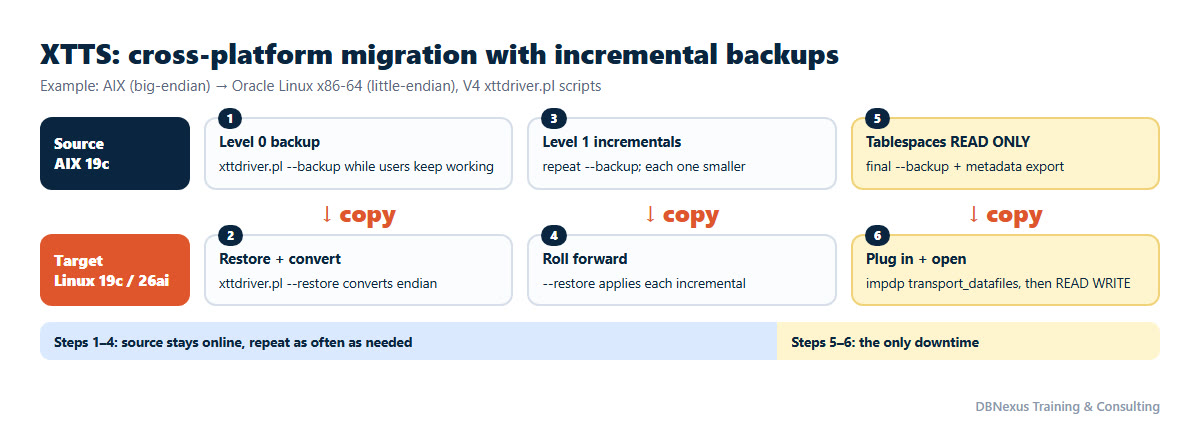
The idea: copy the datafiles while the source stays open, keep them current with incremental backups, and take the outage only for the last small incremental plus the metadata. Oracle's scripts (xttdriver.pl, version 4) are in My Oracle Support note 2471245.1; they handle the endian conversion for you. Example: AIX 19c to Oracle Linux x86-64.
Step 1 — check platforms and self-containment
-- on the source: platform and endian
SELECT d.platform_name, tp.platform_id, tp.endian_format
FROM   v$database d JOIN v$transportable_platform tp
       ON tp.platform_name = d.platform_name;

-- the tablespace set must be self-contained
EXEC DBMS_TTS.TRANSPORT_SET_CHECK('APP_DATA,APP_IDX', TRUE);
SELECT * FROM transport_set_violations;   -- must return no rows
AIX 64-bit is platform ID 6 (big-endian); Linux x86-64 is 13 (little-endian). Objects in SYSTEM, SYSAUX or a tablespace you are not moving show up as violations — fix them before going further.
Step 2 — configure xtt.properties (same file on both sides)
tablespaces=APP_DATA,APP_IDX
platformid=6
src_scratch_location=/u01/xtt/src_backups
dest_scratch_location=/u01/xtt/dest_backups
dest_datafile_location=+DATA
parallel=4
rollparallel=2
usermantransport=1
Step 3 — level 0 backup on the source, restore on the target
# source (AIX), database open, users working
export TMPDIR=/u01/xtt/tmp
$ORACLE_HOME/perl/bin/perl xttdriver.pl --backup --debug 3

# copy the backup pieces to dest_scratch_location and $TMPDIR/res.txt to the target $TMPDIR, then:
# target (Linux)
export TMPDIR=/u01/xtt/tmp
$ORACLE_HOME/perl/bin/perl xttdriver.pl --restore --debug 3
Step 4 — roll forward as often as you like
Run the same --backup on the source and --restore on the target again. Each run takes a level 1 incremental of only the changed blocks, so the runs get faster. Schedule them daily in the weeks before cutover; the night before, run them hourly so the final one is tiny.
Step 5 — cutover (the only downtime)
-- source
ALTER TABLESPACE app_data READ ONLY;
ALTER TABLESPACE app_idx  READ ONLY;
-- final --backup on the source, copy, final --restore on the target (as in step 3)

-- metadata: export the tablespace set from the source...
expdp system DIRECTORY=xtt_dir DUMPFILE=app_tts.dmp LOGFILE=app_tts_exp.log \
      TRANSPORT_TABLESPACES=APP_DATA,APP_IDX

-- ...and plug the converted files in on the target (names from the --restore output)
impdp system DIRECTORY=xtt_dir DUMPFILE=app_tts.dmp LOGFILE=app_tts_imp.log \
      TRANSPORT_DATAFILES='+DATA/APPDB/DATAFILE/app_data.301.1185','+DATA/APPDB/DATAFILE/app_idx.302.1185'

-- target
ALTER TABLESPACE app_data READ WRITE;
ALTER TABLESPACE app_idx  READ WRITE;
Transportable tablespaces carry the data and segment metadata, not users, roles, grants, sequences or PL/SQL owned outside the set. Create the users on the target before the import (or use full transportable export/import with FULL=Y TRANSPORTABLE=ALWAYS), then compile invalid objects and compare object counts and row counts on key tables before you open the application.
Method 2: GoldenGate for near-zero downtime
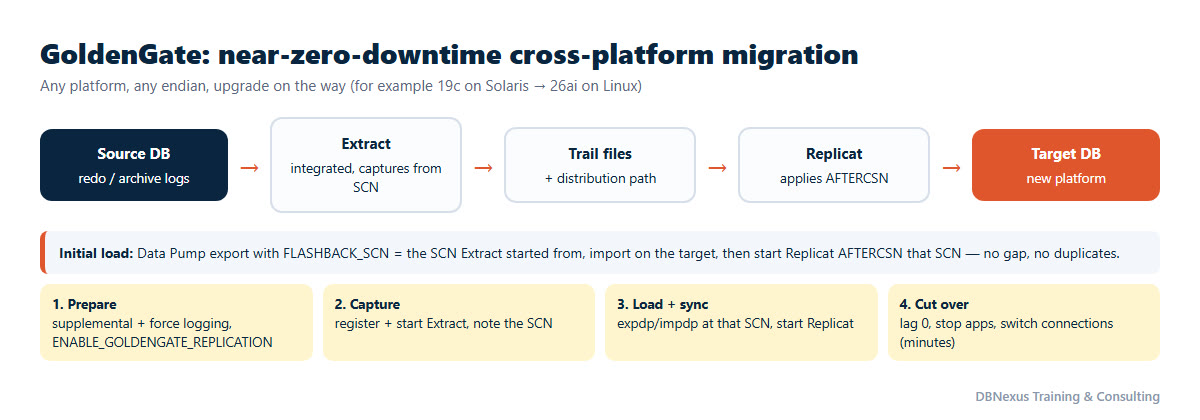
GoldenGate reads changes from the source redo and applies them on the target, so the source never stops until cutover. Example: 19c on Solaris to 26ai on Linux, schema APP.
Step 1 — prepare the source
ALTER DATABASE ADD SUPPLEMENTAL LOG DATA;
ALTER DATABASE FORCE LOGGING;
ALTER SYSTEM SET enable_goldengate_replication = TRUE SCOPE=BOTH;
Step 2 — start capture and note the SCN
-- GoldenGate admin client, source deployment
DBLOGIN USERIDALIAS ggsrc
ADD SCHEMATRANDATA app
REGISTER EXTRACT exta DATABASE
ADD EXTRACT exta, INTEGRATED TRANLOG, BEGIN NOW
ADD EXTTRAIL ea, EXTRACT exta
START EXTRACT exta

-- extract parameter file (exta.prm)
EXTRACT exta
USERIDALIAS ggsrc
EXTTRAIL ea
TABLE app.*;
Once Extract is running, make sure no transaction that started before it is still open (check V$TRANSACTION), then take the SCN you will load from:
SELECT current_scn FROM v$database; -- e.g. 4522871Step 3 — initial load at that SCN, then start Replicat
# consistent export as of the SCN, import on the target
expdp system SCHEMAS=app DIRECTORY=dp_dir DUMPFILE=app_%U.dmp PARALLEL=4 FLASHBACK_SCN=4522871
impdp system SCHEMAS=app DIRECTORY=dp_dir DUMPFILE=app_%U.dmp PARALLEL=4

-- target deployment (trail delivered by a distribution path)
DBLOGIN USERIDALIAS ggtgt
ADD REPLICAT repa, INTEGRATED, EXTTRAIL ea
START REPLICAT repa, AFTERCSN 4522871

-- replicat parameter file (repa.prm)
REPLICAT repa
USERIDALIAS ggtgt
MAP app.*, TARGET app.*;
AFTERCSN is the key: Replicat skips everything already in the export and applies only what changed after it, so there is no gap and no duplicate. For a deeper walkthrough of initial loads, see our guide to initial load extraction in GoldenGate Microservices.
Step 4 — cut over in minutes
- Watch lag with
INFO ALLuntil Replicat is consistently near zero. - Stop the application, wait for lag to reach zero, stop Extract and Replicat.
- Reset sequences on the target to the source values, enable triggers and scheduler jobs, and point the application at the new database.
- Optional safety net: start reverse replication (new → old) so you can fall back without losing new transactions.
Common mistakes on cross-platform projects
- Skipping the self-containment check and finding violations during the outage.
- Forgetting objects outside the tablespace set — users, grants, sequences, synonyms, DB links — with XTTS.
- Starting Replicat without AFTERCSN, or taking the SCN while an older transaction was still open, which creates duplicates or missing rows.
- Not testing the cutover end to end, including the final incremental timing; rehearse it on a copy and measure the real outage.
- Leaving statistics behind; gather or import optimizer statistics before go-live, or the first business day turns into a tuning exercise.
Which one should you use?
If the business accepts a planned outage of an hour or so and the database is large, XTTS is cheaper, simpler and needs no extra licence. If the outage budget is minutes, if you want a fallback path, or if you are also changing the database version and character set, GoldenGate earns its cost. Many large migrations use both: XTTS for the bulk of the data and GoldenGate only for the few systems that cannot stop. Oracle documents the transportable method in Transporting Data in the Database Administrator's Guide. If the destination is the cloud, our guide to what a DBA still manages on OCI covers what changes after go-live.
Practise it before you do it for real
Our live Oracle GoldenGate training covers Extract, Replicat and zero-downtime migration on real systems, and the Oracle patching and upgrade course covers transportable tablespaces and AutoUpgrade for version moves.
Become a production-ready Oracle DBA
Live weekend batches, recorded courses and on-job support — Oracle 19c, RAC, Data Guard, GoldenGate and Oracle AI Database 26ai.