Oracle 23ai AI Vector Search — Build Your First Vector Index in 15 Minutes (2026)
By DBNexus Editorial Team · Oracle DBA
Published June 4, 2026 · 6 min read
Oracle Database 23ai quietly turned the converged database into a vector database: a new VECTOR datatype now sits in the same table as your business data — no separate Pinecone, no bolt-on service, no second system to back up. That matters for every DBA who learned the engine on 19c, because the May 2026 26ai on-premises release makes AI Vector Search production-real on Linux x86-64, governed by the same SQL, security and RMAN you already run. If you can write a CREATE INDEX, you can ship semantic search this week. This hands-on lab takes you from an empty table to a working HNSW vector index and a VECTOR_DISTANCE query in about 15 minutes — and the same SQL runs on both 23ai and 26ai.
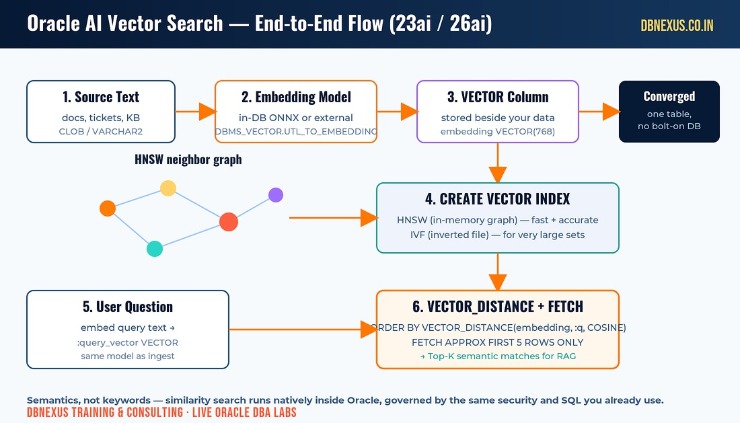 Oracle AI Vector Search flow: source text to embedding model to VECTOR column to HNSW index to VECTOR_DISTANCE query to Top-K matches.
What is Oracle AI Vector Search?
AI Vector Search lets you query data by meaning instead of by keyword. Text, images or documents are passed through an embedding model that turns them into a vector — a long list of numbers that captures semantics. Store that vector in a VECTOR column, and two rows whose vectors are close together are, by definition, similar in meaning. A search for "lost SYS account" can then surface a document titled "reset a forgotten administrator password" even though they share no words.
Two things make Oracle's implementation different from a standalone vector store. First, the embedding can be generated inside the database with a loaded ONNX model, so your text never leaves the instance. Second, the vectors live beside the relational rows they describe, so you can filter by tenant, join to other tables, and enforce the same privileges in one query. For DBAs, that means no new data pipeline to secure and no second database to patch — it is the converged database doing one more job.
Step 1 — Store embeddings in a VECTOR column
Start with an ordinary table and add a VECTOR column. The two arguments — number of dimensions and storage format — must match the embedding model you intend to use; a 768-dimension model needs a VECTOR(768) column or the insert fails.
-- Oracle 23ai / 26ai: a VECTOR column lives beside your business data
CREATE TABLE kb_articles (
  id        NUMBER GENERATED ALWAYS AS IDENTITY PRIMARY KEY,
  title     VARCHAR2(400),
  body      CLOB,
  embedding VECTOR(768, FLOAT32)        -- 768 dims, 32-bit floats
);

-- Load a model once (ONNX) so embeddings are generated in-database:
--   EXEC DBMS_VECTOR.LOAD_ONNX_MODEL('DM','doc_model.onnx','doc_model');

-- Insert a row and embed its text in the SAME statement
INSERT INTO kb_articles (title, body, embedding)
VALUES (
  'Reset a forgotten SYS password',
  'Use orapwd to regenerate the password file ...',
  VECTOR_EMBEDDING(doc_model USING 'Reset a forgotten SYS password' AS data)
);
COMMIT;
That is the whole ingestion contract: text in, vector out, stored next to the row. Repeat it for every document you want searchable. In a real load you would embed in bulk with DBMS_VECTOR_CHAIN.UTL_TO_EMBEDDINGS after chunking large CLOBs, but the column definition never changes.
Step 2 — Build an HNSW vector index
A brute-force scan compares the query vector against every row — fine for a few thousand rows, painful for a few million. An HNSW (Hierarchical Navigable Small World) index builds an in-memory neighbor graph so similarity search stays fast as the table grows. Because HNSW lives in memory, you size the Vector Pool first with vector_memory_size — a static parameter, so plan a restart.
-- HNSW lives in the Vector Pool; size it, then bounce the instance
ALTER SYSTEM SET vector_memory_size = 1G SCOPE=SPFILE;
-- SHUTDOWN IMMEDIATE; STARTUP;   <- required for a static parameter

-- Build the in-memory HNSW graph on the embedding column
CREATE VECTOR INDEX kb_articles_hnsw_idx
  ON kb_articles (embedding)
  ORGANIZATION INMEMORY NEIGHBOR GRAPH
  DISTANCE COSINE
  WITH TARGET ACCURACY 95;

-- Confirm it built
SELECT index_name, index_type FROM user_indexes
WHERE  index_name = 'KB_ARTICLES_HNSW_IDX';
One gotcha to remember in clustered estates: HNSW indexes are not supported on Oracle RAC because the graph is instance-local memory. On RAC, reach for an IVF (Inverted File Flat) index instead — covered in the next section.
If you would rather build this on a guided lab box with a DBA watching your screen, that is exactly what we drill in the live 26ai track at DBNexus — Vector Pool sizing, index rebuilds and accuracy tuning on real data.
How does VECTOR_DISTANCE rank matches?
To search, embed the user's question with the same model used at ingest, then order rows by their distance from that query vector. The magic word is APPROX: it tells the optimizer it may use the HNSW index for an approximate-nearest-neighbor scan instead of an exact full comparison.
-- Embed the question with the SAME model, then rank by similarity
VARIABLE q VARCHAR2(200)
EXEC :q := 'how do I recover a lost sys account';

SELECT id, title,
       VECTOR_DISTANCE(
         embedding,
         VECTOR_EMBEDDING(doc_model USING :q AS data),
         COSINE) AS score
FROM   kb_articles
ORDER  BY score
FETCH  APPROX FIRST 5 ROWS ONLY;   -- APPROX => HNSW index is eligible
Lower COSINE distance means a closer match, so the top five rows are your semantic results — the same Top-K list you would feed to an LLM for retrieval-augmented generation. Drop the APPROX keyword and you force an exact scan, which is the easy way to A/B the index's recall against ground truth. Oracle's AI Vector Search reference on oracle-base.com has a full worked dataset if you want more sample rows to play with.
Watch: a step-by-step AI Vector Search walkthrough in Oracle Database 23ai. For more Oracle DBA labs like this one, subscribe to the Oracle DBA Online Training YouTube channel.
HNSW vs IVF — which vector index should a DBA choose?
HNSW gives the best latency and recall and is the default choice when the graph fits in the Vector Pool — single-instance OLTP-style lookups love it. IVF (Inverted File Flat) partitions vectors into clusters and searches only the nearest clusters; it scales to far larger datasets, rebuilds faster, and crucially it works on RAC. The practical rule: start with HNSW for anything that fits in memory and a single instance, switch to IVF when the dataset outgrows the pool or you need cluster-wide availability. Oracle's HNSW vector index deep dive on blogs.oracle.com breaks down the accuracy-versus-memory trade-offs if you are tuning for a specific SLA.
Do this in production this week
Pin your embedding model and its dimension count, then create VECTOR columns to match — a mismatch is the number-one first-day error.
Size vector_memory_size deliberately and schedule the restart; an undersized Vector Pool silently disables HNSW.
Build HNSW with WITH TARGET ACCURACY, then validate recall by running the same query without APPROX.
On RAC, standardise on IVF indexes from day one instead of discovering the HNSW limitation in an incident.
Add the vector index to your rebuild and patch runbooks so it survives upgrades and Data Guard role changes.
Frequently asked questions
Do I need a separate vector database with Oracle 23ai?
No. The VECTOR datatype, vector indexes and VECTOR_DISTANCE are built into Oracle Database 23ai and 26ai. You store vectors beside your relational data and query them with ordinary SQL, which removes the cost and security surface of a standalone vector store.
Does AI Vector Search need a GPU?
Not for search itself. Distance computation and HNSW traversal run on CPU. A GPU only helps when you generate embeddings at high volume; for in-database ONNX models on modest workloads, CPU is fine.
Why is my HNSW index not being used?
Three usual causes: the query is missing the APPROX keyword, the DISTANCE metric in the query does not match the metric the index was built with, or vector_memory_size is too small to hold the graph. Check all three before assuming an optimizer bug.
Can I use HNSW on Oracle RAC?
No — HNSW is an in-memory, instance-local index and is not supported on RAC. Use an IVF index for clustered databases, which partitions vectors and works across instances.
Ready to ship AI Vector Search in production? Train with DBNexus.
DBNexus Training & Consulting (formerly Oracle DBA Online Training) runs live, instructor-led Oracle DBA programs covering AI Vector Search, HNSW and IVF indexing, 26ai upgrades, RAC, Data Guard and RMAN. Real labs. Real production scenarios. Recorded sessions. Lifetime access.
Hands-on labs — build VECTOR columns, HNSW indexes and VECTOR_DISTANCE queries on a real 23ai/26ai instance
Production scenarios — Vector Pool sizing, RAC-safe IVF design, and upgrade-safe runbooks
1000+ DBAs trained globally, with interview prep and CV review included
Flexible weekday and weekend batches across IST-friendly timings
Subscribe to our YouTube channel for 200+ free Oracle DBA tutorials
📞 CALL NOW: +91 8169158909 — talk to the DBNexus team directly about the next batch, fees and a demo. (India, IST 9 AM–10 PM.)
👉 Enroll for Oracle DBA Training → · Visit DBNexus.co.in
Only a handful of lab seats remain in the next 26ai + AI Vector Search cohort — mention this post when you call and your first Vector Search lab session is free.
Become a production-ready Oracle DBA
Live weekend batches, recorded courses and on-job support — Oracle 19c, RAC, Data Guard, GoldenGate and Oracle AI Database 26ai.